How to Choose Vivid Northern Lights Dancing Above Snow Laden Pines for a Clean Desktop Setup
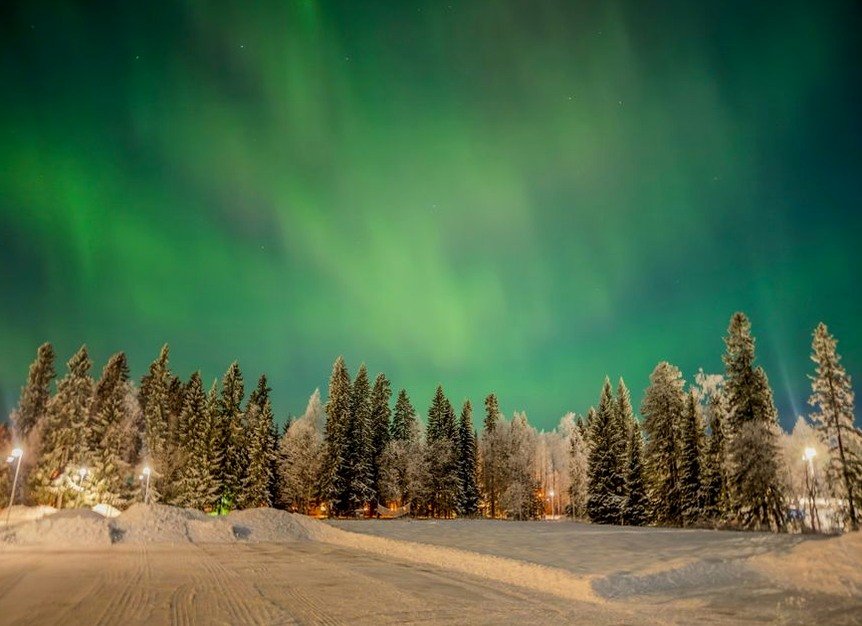
How to Choose Vivid Northern Lights Dancing Above Snow-Laden Pines for a Clean Desktop Setup
Your desktop wallpaper sets the tone for every work session, and a high-resolution northern lights scene over snow-covered pines delivers both visual calm and sharp detail on modern displays. The right image reduces eye strain during long hours, keeps your icons legible against a naturally dark background, and loads instantly without the performance drag of animated alternatives. Free 3840x2400 wallpapers deliver native clarity for 4K monitors while scaling cleanly to 1920x1080 screens, so you get professional-grade visuals without subscription fees or license restrictions.
Resolution and Display Match
A 3840x2400 source file covers 4K displays at full pixel density and downsamples smoothly to QHD or Full HD without blur. Northern lights wallpapers work particularly well because the gradient transitions between green auroras and dark sky compress efficiently, keeping file sizes under 5 MB for fast desktop switching. Pine silhouettes in the foreground add depth without cluttering your icon grid, and snow reflects enough ambient light from the aurora to keep the overall scene from going pitch black.
Check your monitor’s native resolution before downloading. If you’re running a 2560x1440 panel, a 3840x2400 image scales down at a clean 1.5x ratio. Mismatched aspect ratios force cropping or stretching, which turns a crisp aurora band into a smudged gradient.
Color Accuracy for Professional Use
Vivid doesn’t mean oversaturated. The best northern lights wallpapers preserve natural color balance—green and blue aurora bands with occasional magenta highlights—so your eyes adjust quickly when you switch between the desktop and color-critical work in Photoshop or Premiere. Overly processed images with neon greens fatigue your vision and skew your perception of accurate color in design files.
Download a sample, set it as your background, and open a neutral gray document. If the gray looks tinted or if whites appear dingy, the wallpaper’s color cast is too strong. Swap it for a version with deeper blacks and softer aurora intensity.
Practical Selection Scenario
Suppose you manage a team of five designers, each running dual 27-inch 4K monitors. You want a cohesive visual identity across workstations without mandating identical setups. Download three to five northern lights variations from How to Choose Vivid Northern Lights Dancing Above Snow-Laden Pines for a Clean Desktop Setup in 3840x2400 resolution. Each file at 4 MB means 20 MB total storage and roughly 90 seconds of download time on a standard office connection.
Distribute the set through a shared drive. Each designer picks the composition that works best with their icon layout—some prefer the aurora centered, others want it offset to leave the right third clear for desktop shortcuts. Total setup time per person runs under three minutes, and the unified aurora theme keeps the workspace professional during screen shares and client calls.
File Format and Performance
JPEG compression handles northern lights gradients better than PNG for wallpapers because the smooth color transitions don’t need lossless encoding. A 3840x2400 JPEG at 90% quality sits around 3-4 MB and displays identically to an 18 MB PNG on your desktop. Your operating system caches the wallpaper in memory, so format choice doesn’t affect day-to-day performance, but smaller files make initial setup and cloud backup faster.
Avoid animated wallpapers or live aurora simulations. They consume 8-15% GPU cycles continuously, heating your laptop and draining battery during mobile work sessions. A static high-resolution image gives you the same visual impact with zero performance cost.
Free Access and Licensing
Wallpapers4screen.com offers northern lights landscapes as free downloads without registration walls or usage restrictions. You can deploy the same image across personal and work machines, set it on multiple monitors, and share it with colleagues. Compare that to premium wallpaper services charging $5-$12 monthly for access you’ll use once, and the value becomes clear—download what you need today, keep it permanently, and revisit the catalog when your aesthetic preferences shift next quarter.
- Reference: https://wallpapers4screen.com/
Write a comment