Top Desktop Backgrounds in Birds Vibrant Tropical Parrots and Toucans in Lush Foliage in Ultra HD
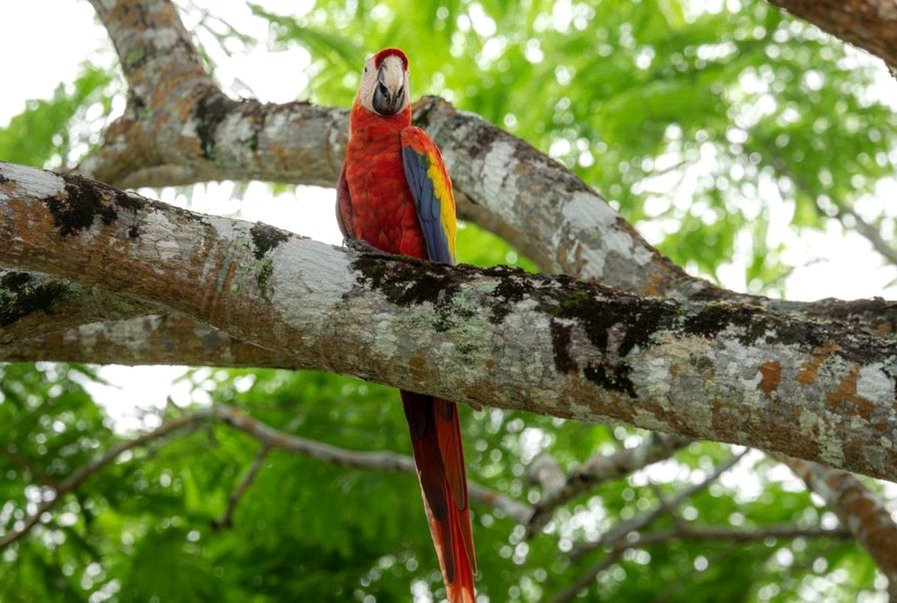
Top Desktop Backgrounds in Birds: Vibrant Tropical Parrots and Toucans in Lush Foliage in Ultra HD
Finding the right bird wallpaper
The strongest tropical option listed is the 3840x2400 Scarlet macaw image, showing a red-and-green macaw on a branch against a blue sky and jungle bokeh. That resolution suits large desktop displays because it gives you enough pixels for a sharp image without stretching a smaller file. The page describes the wallpapers as free desktop downloads, so you can begin without entering payment details.
The material specifically identifies a Scarlet macaw and other parrot imagery. It does not provide a confirmed toucan title, so check the current category before assuming a toucan file is available. This small verification step prevents a wasted download and keeps the final choice aligned with your tropical foliage theme.
Using a four-stage selection workflow
Selecting the subject
Open the birds category and scan for terms such as «Scarlet macaw», «red-and-green macaw», «red parrot», «jungle», «bokeh», and «parrot on branch». These labels identify the image content more reliably than a thumbnail alone, especially when several bird wallpapers use similar green backgrounds.
You can review the Top Desktop Backgrounds in Birds: Vibrant Tropical Parrots and Toucans in Lush Foliage in Ultra HD collection before downloading. Keep the macaw image at the top of your shortlist if you want bright red, green, and blue colors with foliage-related depth.
Verifying the file size
Confirm that the download shows 3840x2400 before saving it. This is the documented resolution for the Scarlet macaw wallpaper, and it gives you a clear quality benchmark when comparing other bird images on the page.
Do not rely on the phrase «4K» alone. The listed dimensions provide the practical check, while a generic thumbnail can hide a lower-resolution file or a different crop. If the download page shows another size, inspect it before replacing your current background.
Checking the composition
Preview the full image and look at the position of the macaw, branch, sky, and blurred foliage. A bird placed near the center can compete with desktop icons, while open space on one side usually keeps folders and shortcuts easier to read.
Choose the original 3840x2400 file rather than a screenshot of the preview. A screenshot may add interface elements, reduce sharpness, or introduce a crop that was not part of the downloadable image. Saving the original file protects the detail in feathers, leaves, and background bokeh.
Testing the desktop fit
Set the image temporarily as your background and check the operating system’s fit mode. «Fill» may crop the outer edges, while «Fit» may create unused space if your monitor has a different aspect ratio.
Before keeping the wallpaper, move several desktop icons across the image. If red feathers or bright leaves sit directly behind the labels, try a different crop or use a less crowded portion of the picture. This quick test prevents repeated adjustments after the image becomes part of your daily workspace.
Preventing download delays
Use the page title and resolution as your first filters instead of opening every bird image. The collection spans 17 pages, so narrowing your search to macaw, parrot, jungle, and the documented dimensions can reduce unnecessary browsing.
Download one candidate at a time and confirm that the file opens before moving to the next image. If the file does not display correctly, return to the download page rather than editing or renaming a damaged copy. Keep the original filename until the image passes your quality check.
A practical folder structure also saves time. Create a folder named «Bird wallpapers» and use separate names for «macaw jungle», «parrot branch», and any verified toucan image. This makes later changes easier and prevents the wrong wallpaper from being selected by mistake.
Checking free-download conditions
The page presents these bird wallpapers as free desktop downloads. It does not state commercial licensing terms, resale rights, modification permissions, or a separate paid service, so do not assume that a free download covers every type of use.
For a personal desktop, retain the page address and the original download details. If you plan to use the image in advertising, packaging, a public website, or a product, verify the current license information on the download page first. A saved copy of the image alone does not prove commercial permission.
The page identifies Wallpapers4screen.com and shows a 2026 copyright notice. Check that the address is the expected domain before downloading, particularly if a search result redirects through another site or requests payment for a file described as free.
Checklist before payment
- Confirm that the image is the Scarlet macaw or another verified tropical bird, not a similarly labeled preview.
- Check the listed dimensions and prefer the documented 3840x2400 file when available.
- Open the downloaded image before changing your desktop settings.
- Compare the crop with your monitor and check icon visibility.
- Verify whether the intended use is personal or commercial.
- Do not enter payment details unless the page clearly explains a separate paid product and its terms.
For a personal desktop, the 3840x2400 Scarlet macaw wallpaper is the clearest documented match for vivid tropical color, a branch composition, and a jungle-style background. Verify the file, test the crop, and keep the original download details before making it your permanent background.
- Reference: https://wallpapers4screen.com/
Write a comment