Best 4K Birds Wallpapers Hummingbirds Hovering Beside Bright Summer Blossoms
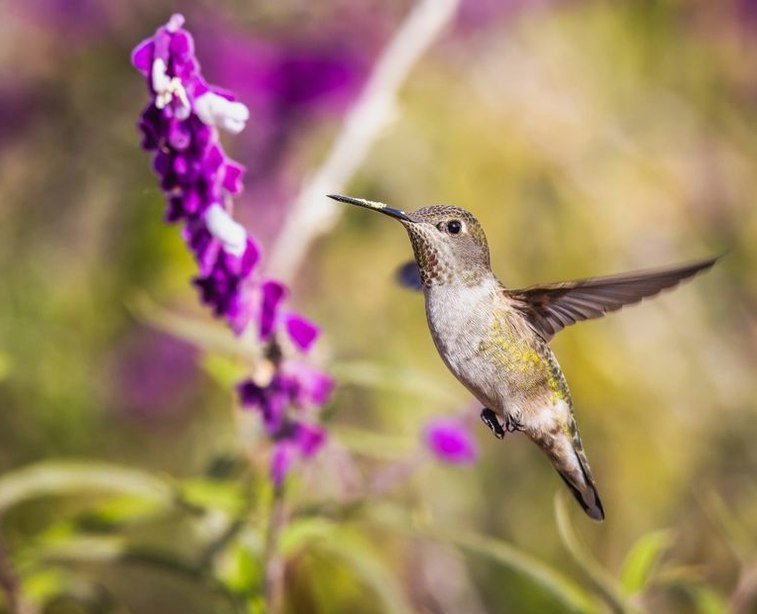
Best 4K Birds Wallpapers: Hummingbirds Hovering Beside Bright Summer Blossoms
A hummingbird wallpaper looks sharp on a 4K screen only when the file matches your display’s pixel grid and the bird sits clear of your icons. Wallpapers4screen.com offers its birds category as free desktop downloads at 3840x2400, enough resolution for a 4K monitor with room to crop. The workflow below takes about ten minutes and saves you from the usual cycle of downloading, squinting, and replacing.
Step 1. Confirm what your screen needs
Open your display settings and write down the native resolution. Most 4K monitors run 3840x2160, a 16:9 shape. The files in the birds category are 3840x2400, which is 16:10.
That difference works in your favor. The width matches exactly, so nothing gets upscaled or blurred. Your system only trims 240 pixels of height, 120 from the top and 120 from the bottom. On a 16:10 laptop panel, the image fits edge to edge with no trimming at all.
Step 2. Search the category with a plan
The birds section runs 17 pages. Page one leans heavily toward macaws, bald eagles, hawks, and owls, so hummingbird shots take some paging to find. Each image has a descriptive tag line under it, and those tags are the fastest filter.
Look for tags that name the species, then for words like “bokeh” or “close-up.” A blurred background matters more for a hummingbird than for an eagle, because the bird is tiny and busy petals compete with it. You can start the search here: Best 4K Birds Wallpapers: Hummingbirds Hovering Beside Bright Summer Blossoms.
Step 3. Check the composition before you download
A photo can be beautiful and still fail as a desktop. Run three quick checks on the preview.
- Find the bird. If it sits on the left third, your desktop icons will cover it, so pick a frame with the bird right of center.
- Look at the top and bottom edges. A wing tip or blossom within the outer 5% of the frame will be cut on a 16:9 screen.
- Judge the brightness. Summer flowers in full sun can glare at night, but a darker green background keeps icon labels readable.
Step 4. Verify the file after download
Preview thumbnails are small, and saving one by mistake is the most common reason a wallpaper looks soft. Use the download button, then open the file properties and confirm the dimensions read 3840x2400. If the numbers are smaller, you saved the thumbnail.
Next, view the image at 100% zoom and inspect the bird’s eye and throat feathers. Wing blur is normal, because hummingbird wings move too fast for most shutter speeds. A soft eye is a real flaw, and you’ll notice it every day.
Step 5. Set it with the right fit mode
Choose “Fill” on a 16:9 monitor so the width stays pixel-for-pixel. Avoid “Stretch,” which squashes the bird to fit the screen. On dual monitors, set the image per screen, because spanning one hummingbird across two panels splits it at the bezel.
Common concerns
The first is cost. The category is labeled as free downloads for desktop, so setting an image as your own background costs nothing. No payment step appears anywhere in the process.
The second is usage rights. Free desktop use doesn’t automatically cover printing, client work, or resale. If you plan anything beyond a personal background, ask through the Feedback link on Wallpapers4screen.com before you use the file.
The third is wasted time. Most of it goes to re-downloading after a bad fit, and Steps 1 and 3 prevent that.
Checklist before you download
- Your native resolution is written down, and you know whether the panel is 16:9 or 16:10.
- The bird sits away from your icon column and at least 5% inside the top and bottom edges.
- Background blossoms are soft enough that icon labels stay legible.
- File properties show 3840x2400, not thumbnail dimensions.
- The eye is sharp at 100% zoom.
- Any use beyond a personal desktop has been cleared through the site’s Feedback link.
Open the birds category, pick two candidates, and run both through this list before you set either one.
- Reference: https://wallpapers4screen.com/
Write a comment