Top Desktop Backgrounds in Landscapes Volcanic Craters Red Canyons and Ancient Rock Formations in
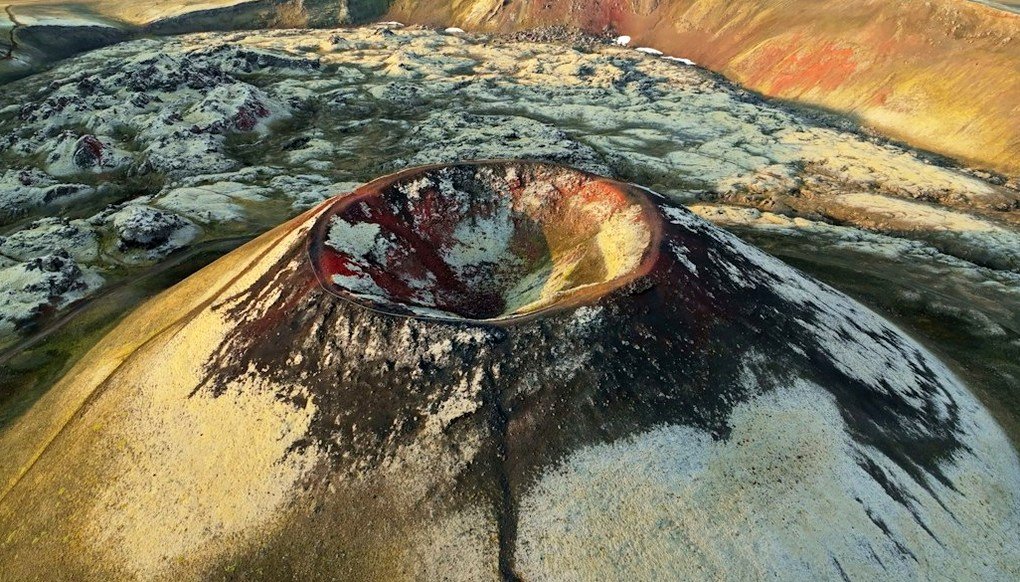
Top Desktop Backgrounds in Landscapes: Volcanic Craters, Red Canyons, and Ancient Rock Formations in Ultra HD
Ultra HD landscape wallpapers can give a desktop a strong sense of scale without adding visual clutter. The Wallpapers4screen landscape collection lists free desktop images in 3840x2400 resolution, including mountain lakes, forests, rivers, islands, and aerial natural scenes.
For buyers choosing backgrounds around volcanic craters, red canyons, and ancient rock formations, the first risk is assuming that every image matches the title. The published collection description names several landscape themes, but it does not specifically confirm volcanic craters, red canyons, or ancient rock formations. Check each preview before downloading so the final image matches the scene you need.
What the collection actually offers
The listed wallpapers use a 3840x2400 format, which gives a large desktop canvas and enough detail for modern high-resolution displays. Several entries are marked 4K, although the supplied dimensions remain the clearest specification for checking compatibility.
Relevant landscape categories include mountain scenery, rocky natural environments, aerial river views, tropical forests, islands, and coastlines. A mountain lake viewed from a canoe can create a wide, open background, while an aerial jungle river gives the desktop a stronger top-down composition. These choices matter because icons remain easier to locate when the image has clear areas with limited visual detail.
The collection also includes a northern-lights and Milky Way scene above a pine forest, as well as Sequoia forest imagery. Those backgrounds suit users who want geological or wilderness atmosphere without placing a bright subject directly behind desktop shortcuts.
How to avoid a poor first download
Start by checking the image dimensions against the monitor’s native resolution. A 3840x2400 file may display well on a large screen, but the aspect ratio can require cropping on a widescreen monitor. Cropping may remove the crater rim, canyon walls, or rock formation that attracted you to the image.
- Preview the full composition before saving the file. A close-up can look dramatic but leave little calm space for icons.
- Check whether the scene is labeled 4K or simply listed with its pixel dimensions. Use the dimensions as the practical reference.
- Compare the horizon and main subject with your screen orientation. A tall rock formation may lose its shape on a wide display.
- Keep the original download until the wallpaper looks correct at full screen. Repeated conversion can reduce sharpness.
These checks reduce the chance of downloading a visually attractive image that becomes poorly cropped or too busy after installation. They also help separate genuine landscape matches from broader nature images such as forests, lakes, and tropical waterways.
Where to find suitable landscape scenes
You can browse the Top Desktop Backgrounds in Landscapes: Volcanic Craters, Red Canyons, and Ancient Rock Formations in Ultra HD category and inspect the available previews. The page is presented as a free landscape wallpaper section, with the supplied catalog showing page 1 of 505 and multiple 3840x2400 entries.
Use the preview to identify visual traits rather than relying on a broad category label. Look for layered stone, exposed cliffs, deep valleys, dark volcanic textures, or warm red terrain. Since the provided catalog examples focus heavily on lakes, forests, rivers, islands, and coastal views, a specific geological subject should be verified image by image.
Managing display and download risks
Wallpaper downloads can create practical problems when users save the wrong file, overlook the resolution, or install an image that obscures desktop shortcuts. A simple folder structure helps: keep original files in one location and resized copies in another. This makes it easier to restore the preferred version after testing different crops.
The supplied material describes free downloads, image subjects, resolution, and the category structure. It does not state contract guarantees, insurance terms, delivery commitments, commercial licensing conditions, or formal support obligations. Treat the images as desktop wallpaper downloads and review any usage terms shown on the page before using them in advertising, resale products, or client presentations.
For a first selection, choose one 3840x2400 preview with a clear focal area, test it on the desktop, and confirm that the geological subject remains visible after cropping. If the page does not clearly show a volcanic crater, red canyon, or ancient rock formation, continue through the category instead of relying on the headline alone.
- Reference: https://wallpapers4screen.com/
Write a comment