Top Desktop Backgrounds in Food Gourmet Burgers and Flame Grilled Dishes in Moody Lighting in Ultra
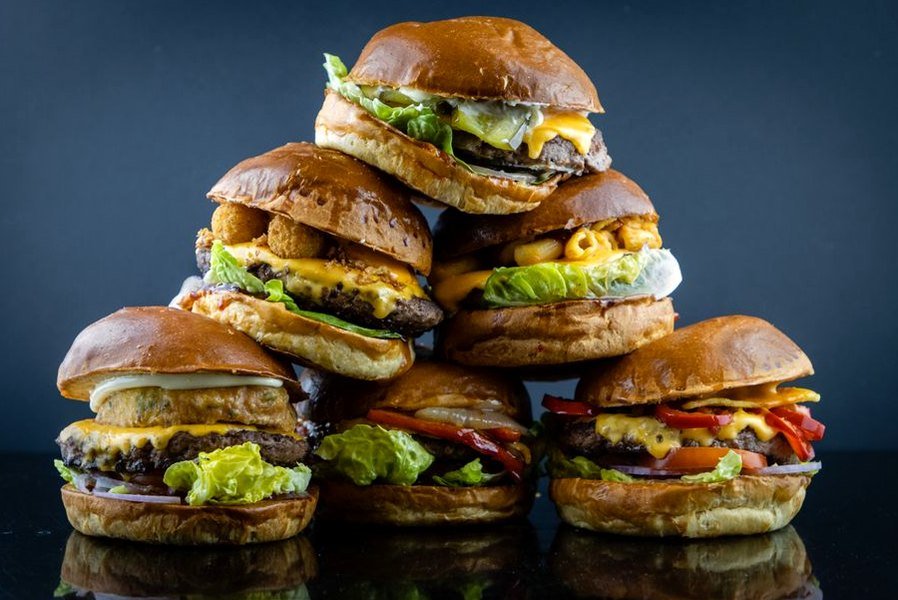
Top Desktop Backgrounds in Food: Gourmet Burgers and Flame-Grilled Dishes in Moody Lighting in Ultra HD
A dark, high-resolution image works well on a food-focused desktop because it preserves texture, controls bright highlights, and leaves enough open space for icons. The food wallpaper collection at Wallpapers4screen.com includes free desktop images in 3840x2400 resolution. That size suits large monitors and keeps details such as burger layers, grill marks, sauces, and charred surfaces sharp.
Even with a digital download, it is worth checking the page before saving the file. For a restaurant office, menu design station, or content studio, review the image dimensions, subject description, preview, and download format. The page should make it clear whether the file shows a gourmet burger, a flame-grilled dish, or a different type of food photograph.
How to verify the image before downloading
Begin with the listed resolution. The collection identifies images at 3840x2400, which can fill a wide desktop display without immediate pixelation. After downloading, confirm that the file retains those original dimensions, particularly if it will be used on a large monitor or shared production workstation.
Examine the preview at a larger size rather than judging it from a thumbnail. Flame-grilled dishes should show visible grill marks, crisp edges, and clear separation between the plate, food, and surrounding background. A burger needs readable layers, including the bun, filling, sauce, and grilled ingredients. If heavy shadows obscure those elements, the image may look appealing in the preview but become difficult to use as a desktop background.
Subject tags can help narrow the selection. The collection uses descriptions such as close-up, fresh food, background, and high-quality 4K imagery. For this purpose, focus on previews with cooked dishes, dark surfaces, warm highlights, and enough open space for desktop icons.
Digital warehouse inspection for a wallpaper collection
Compare the image title, preview, resolution, and downloaded file before adding an asset to the working library. All four should describe the same image. This check helps prevent a low-resolution substitute or an unrelated photograph from being saved under the wrong project.
Use the same process for every candidate. Open each preview at a larger size, assess the central food detail, and inspect the darkest areas for blocked shadows. Moody lighting should add depth without hiding burger filling or reducing flame-grilled meat to an indistinct silhouette.
The food category includes many close-up compositions, so a broad category label is not enough on its own. A clear filename, a careful preview check, and confirmation of the subject can prevent a fruit image from being downloaded when the project calls for burgers or grilled dishes.
Packaging reinforcement for downloaded files
For a digital asset, preserving the original file during transfer and storage is the practical purpose of packaging reinforcement. Save the download in a dedicated folder instead of moving it repeatedly between temporary locations. Keep the original 3840x2400 file unchanged, and create a separate copy whenever you need to crop, brighten, or adapt the image for another screen.
This workflow reduces accidental compression. Repeated exports can soften grill marks, diminish sauce texture, and flatten the contrast that gives moody food photography its depth. Keeping a clean original also makes it easier to restore the background after an unsuccessful crop or design experiment.
Use a descriptive filename that identifies the food subject and resolution. A name that includes the dish type and 3840x2400 dimensions is easier to recognize than a generic download name. It can also reduce duplicate downloads when several staff members manage the same visual library.
Batch consolidation for multiple workstations
When a restaurant team, studio, or food brand needs several approved backgrounds, place the selected files in one review folder. Remove duplicates and retain only images that meet the same resolution and visual standard. This keeps individual workstations from accumulating unrelated files from different pages.
Compare the images for a consistent mood before distributing the batch. A dark burger close-up can sit comfortably beside another flame-grilled dish, while a bright fruit photograph may make the set feel disconnected. Grouping the files by subject, lighting, and resolution creates a more coherent working library.
You can browse the Top Desktop Backgrounds in Food: Gourmet Burgers and Flame-Grilled Dishes in Moody Lighting in Ultra HD collection to compare available food-themed options. Use the previews to create a shortlist, then verify every selected file individually rather than assuming that all images in the category meet the same standard.
What to check before using the background
The collection describes free desktop wallpaper downloads, but each file still needs a final check. Confirm that the image opens correctly, retains its stated dimensions, and looks balanced on the intended screen. Examine the icon area as well. Bright highlights directly beneath desktop shortcuts can make an otherwise attractive burger image difficult to use.
For a shared office, approve a small set instead of changing backgrounds constantly. Choose images with stable contrast, recognizable food detail, and enough negative space for folders and application shortcuts. A creative workstation can retain several alternatives so the team can match the background to a campaign, menu concept, or presentation mood.
Acceptance checklist
- Verify that the preview clearly shows a gourmet burger or flame-grilled dish.
- Confirm the listed 3840x2400 resolution after downloading.
- Inspect grill marks, sauces, bun texture, and darker shadow areas at full size.
- Save the original file separately from edited copies.
- Remove duplicates before creating a shared batch for several workstations.
- Check that desktop icons remain readable against the selected composition.
- Open the Wallpapers4screen.com food category and approve each file individually.
- Reference: https://wallpapers4screen.com/
Write a comment