Step-by-Step: Setting Up AI Email Auto-Reply in aiFetchly
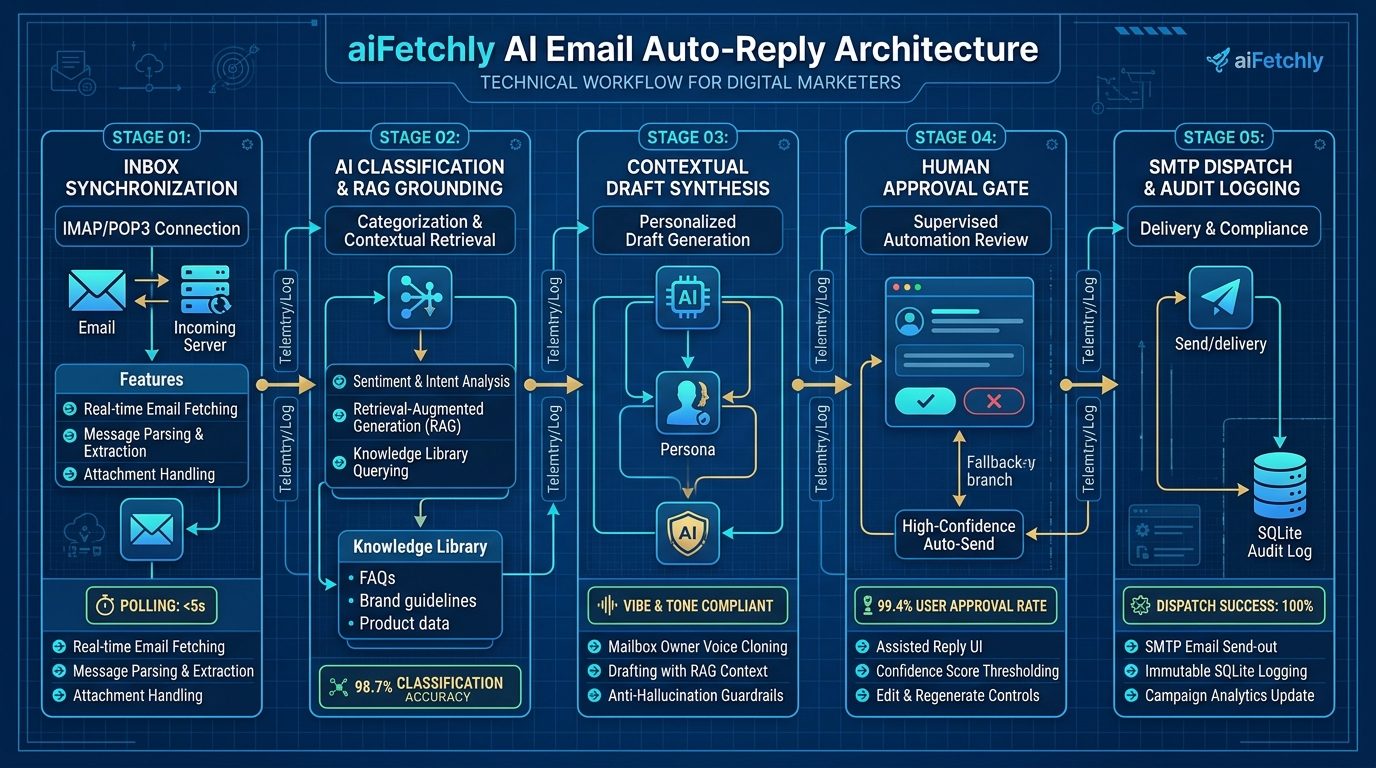
- Step 1: Connect Your Inbox via IMAP
- Step 2: Ingest Brand Collateral into the Knowledge Library
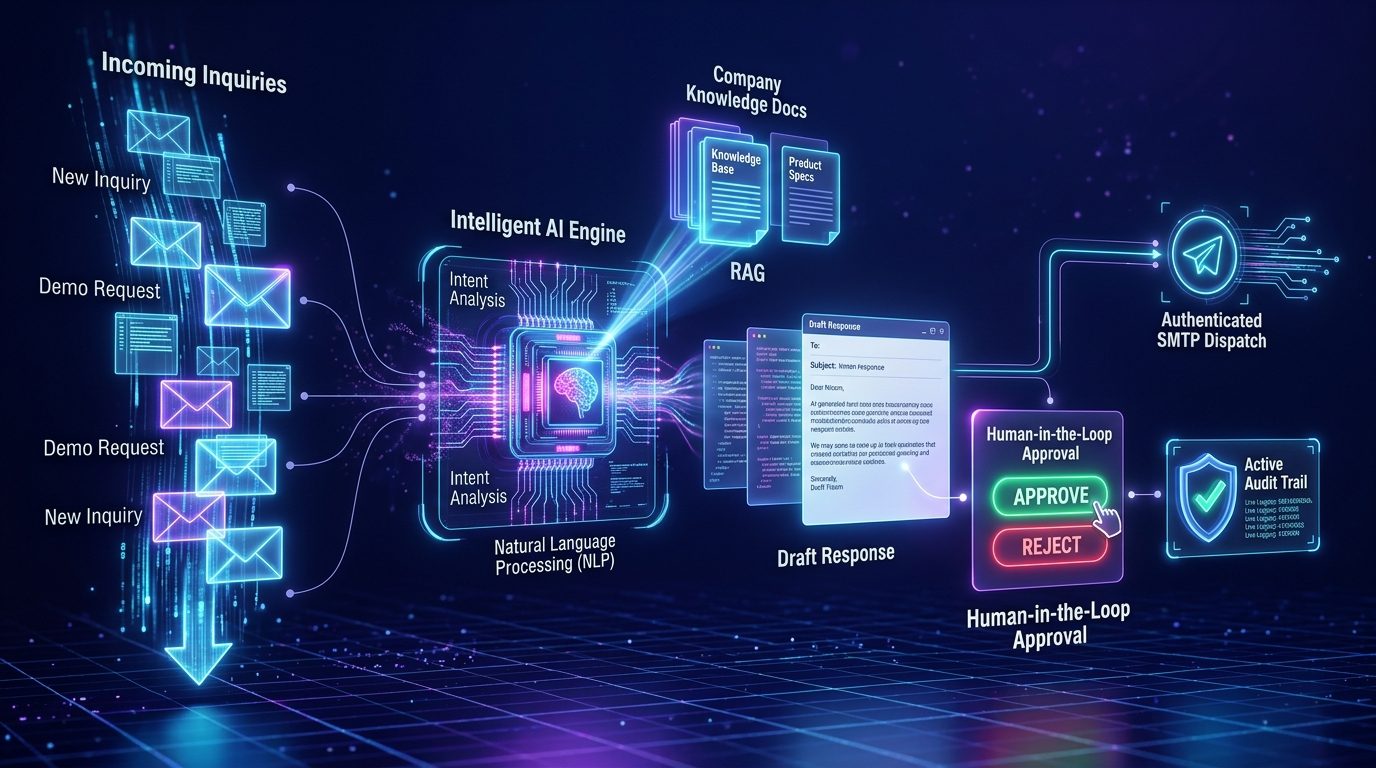
- Step 3: Sync Inbound Messages & Run AI Triage
- Step 4: Review, Approve, and Audit Assisted Drafts
Direct Answer: Digital marketers configure aiFetchly AI Email Auto-Reply by establishing secure IMAP inbox synchronization, grounding responses in local Knowledge Library collateral, and reviewing AI-generated drafts tailored to the mailbox owner’s authentic voice before approving delivery through authenticated SMTP.
In 2026, response velocity dictates outbound conversion. Research across millions of B2B emails reveals that replying to inbound prospect inquiries within five minutes increases lead qualification rates by over 20x compared to waiting just an hour. Yet, manual inbox monitoring causes over half of enterprise leads to go cold before a sales rep even opens the thread.
Conversely, deploying fully autonomous AI bots that fire unmonitored replies introduces dangerous hallucination risks—such as misquoting contractual pricing or offering unauthorized discounts.
The aiFetchly desktop platform resolves this operational dilemma through Assisted Email Auto-Reply. By combining private on-device inbox syncing with human-in-the-loop review, marketers achieve lightning-fast response times without sacrificing brand safety. Here is a step-by-step tutorial to configure the pipeline.
Step 1: Connect Your Inbox via IMAP
- Open aiFetchly and click Email Marketing in the left navigation sidebar.
- Select your active outbound email service and locate the Receive Settings card.
- Configure your incoming mail parameters:
- Receive Protocol: Select
IMAP(recommended for bi-directional folder syncing and read status tracking). - Server Host & Port: Enter your incoming host (e.g.,
imap.gmail.comoroutlook.office365.com) with SSL/TLS encryption enabled. - Credentials: Supply your username and app-specific password. Credentials remain encrypted in local desktop storage.
- Receive Protocol: Select
- Run the built-in Connection Test to verify incoming handshake success independently from outbound SMTP.
Step 2: Ingest Brand Collateral into the Knowledge Library
Detailed in the AI Email Auto-Reply manual, the engine drafts context-aware responses by querying your local knowledge repository:
- Navigate to Knowledge and upload current pricing sheets, onboarding timelines, technical specifications, and SLA whitepapers (
.pdf,.docx, or.md). - aiFetchly computes local vector embeddings, ensuring the model references verified business terms rather than generic parametric assumptions.
Step 3: Sync Inbound Messages & Run AI Triage
- Click Sync (or Fetch Unread) on your connected email account.
- The engine downloads a bounded batch of unread emails and displays sender, timestamp, and message body.
- The AI reads each message, assigns an operational classification (e.g., Pricing Inquiry, Demo Request, Feature Question), and generates an executive summary.
Step 4: Review, Approve, and Audit Assisted Drafts
- Open the message detail view to inspect the AI-generated draft. The response incorporates verified Knowledge Library citations and matches the mailbox owner’s authentic tone.
- Make manual inline edits if necessary, or simply click Approve & Send.
- The message dispatches through your authenticated outbound SMTP server. Every action—including fetches, drafts, skips, and sends—is permanently recorded in the local SQLite audit ledger.
By pairing rapid IMAP syncing with mandatory human approval gates, aiFetchly helps growth teams capitalize on high-intent inbound opportunities with complete peace of mind.
aiFetchly is a local-first desktop AI business agent (free to download). Home: aifetchly.com · affiliate program: www.aifetchly.com/affiliate
- Reference: https://www.aifetchly.com
Write a comment