Best 4K Animals Wallpapers Tiny Forest Wildlife Like Squirrels and Hedgehogs in Macro
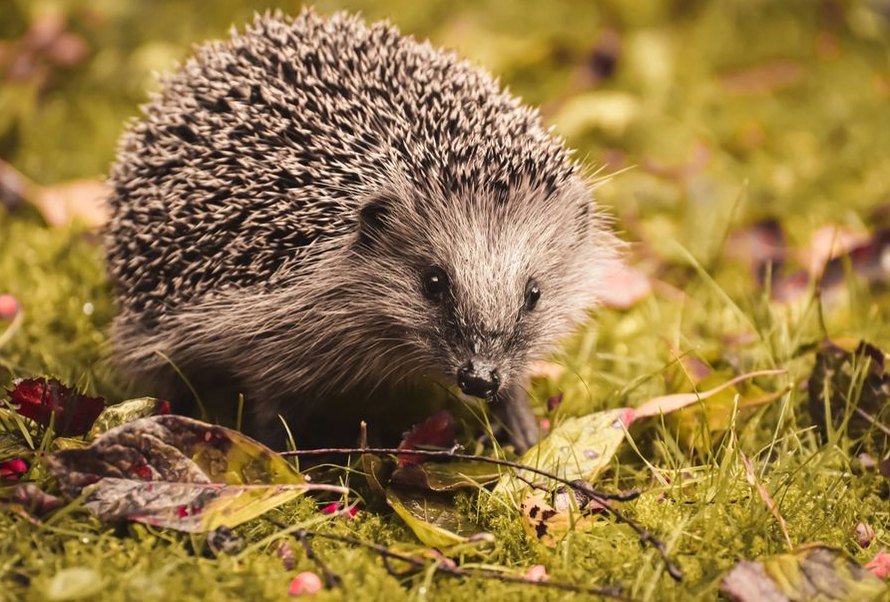
Best 4K Animals Wallpapers: Tiny Forest Wildlife Like Squirrels and Hedgehogs in Macro
A macro shot of a squirrel or hedgehog only looks sharp on a 4K monitor if the file has at least as many pixels as the screen. Wallpapers4screen.com offers its animal wallpapers for desktop at 3840x2400, and the download is free. That size covers a standard 4K panel with room to spare, so fur, whiskers, and spines stay crisp instead of being stretched.
Why macro wildlife needs the full 3840x2400 file
Macro photography lives on fine texture. A hedgehog’s spines or the hairs on a squirrel’s ear tufts are only a few pixels wide, and upscaling a smaller image turns them into a soft smear. A 3840x2400 file holds about 9.2 million pixels, so a 4K screen shows it without inventing any detail.
The second advantage is the background. Macro shots usually have a soft bokeh backdrop of moss, leaves, or snow, and that blur gives desktop icons a calm surface to sit on. You get a detailed subject and still find your folders at a glance.
Which screen gets the cleanest result
The 16:10 shape of these files matches some monitors exactly and others almost exactly. Here is how the same download behaves on four common screens.
- On a 3840x2400 display the picture maps pixel for pixel, with no cropping and no scaling.
- A 3840x2160 monitor keeps the full width and trims 240 rows, about 120 pixels from the top and the bottom.
- Laptops at 2560x1600 scale the image down by a factor of 1.5, which keeps the frame intact and sharpens it slightly.
- Older 1920x1200 panels shrink it by exactly half, so every screen pixel is built from four source pixels.
The 16:9 case is the only one that loses part of the frame, and the loss is 10% of the height. Choose shots where the animal sits near the center, because a squirrel’s ears at the very top edge would be clipped. For every other screen on the list, the full composition survives.
Single image or a rotating set
One wallpaper is the faster option, since you pick, download, and set it in about a minute. A rotating set takes longer to assemble but pays off for weeks, because the desktop changes before you get tired of it. For anyone who keeps the computer on all day, the set is the better choice.
The animals category at Wallpapers4screen.com runs to 309 pages, so building a themed set is a matter of filtering, not settling. Browse the Best 4K Animals Wallpapers: Tiny Forest Wildlife Like Squirrels and Hedgehogs in Macro and save only the close-ups with blurred forest backgrounds. Mixing seasons works well here, with snowy forest scenes for winter and green moss for summer.
A sample calculation for a 20-image set
Suppose you want a full workday without a repeat. With the wallpaper changing every 30 minutes, 20 images cover 10 hours. Now assume, purely as an illustration, that each file averages 3 MB. The whole set would weigh about 60 MB, and a 50 Mbps connection would pull it down in roughly 10 seconds.
Real file sizes depend on the image, since a busy forest floor compresses worse than a smooth blurred background. The selection takes far longer than the transfer. Plan 15 to 20 minutes for choosing the shots and a few seconds for the download itself.
Three doubts worth settling before you download
The first is cost. The site lists its wallpapers as free to download for desktop, so a 20-image set costs the same as one image, which is nothing. Check the terms on the site if you plan any use beyond your own desktop.
The second is cropping on a 16:9 monitor. The 240-row trim is predictable, so you can judge each image before saving it. If the animal’s head or paws touch the top or bottom tenth of the preview, skip that shot.
The third is whether a busy image will bury your icons. Macro wildlife handles this better than landscape photography, because most of the frame is out of focus. Keep icons on the side opposite the animal and they stay readable.
Where to start
Check your display resolution in the system settings and match it against the four cases above. Then open the animals category on Wallpapers4screen.com, download one squirrel or hedgehog macro at 3840x2400, and set it as your background. If the center of the frame looks right on your screen, which 19 images will you add to finish the set?
- Reference: https://wallpapers4screen.com/
Write a comment