How finger and talk work at hi@pablomurad.com

pico, which shows up a lot below, is a POSSE project of mine (publish on my own site, syndicate elsewhere), made for my own personal use.
Two commands from a Unix shell reach me on this server:
$ finger hi@pablomurad.com
Login: hi Name: Pablo Murad
Directory: /home/hi Shell: /bin/bash
On since Sat Nov 21 22:15 (-03) on pico
10 minutes idle
Project:
Independent web projects, decentralized networks, Unix and
experimental Internet protocols.
Plan:
Building runv.club, a small public Unix server from Brazil.
$ talk hi@pablomurad.com
The first prints a short page about me: what I’m working on, my latest notes and posts, and whether I’m around. The second rings me for a live chat, letter by letter, in the terminal. Both protocols are older than the web, and both have been running here since August 2026 on a Debian server. In November they learned two new tricks: finger now knows when I’m online, and a talk call rings my phone through Telegram.
1971 Finger is born at Stanford
1983 Talk ships with 4.2BSD
1991-12 RFC 1288, the finger spec still in use
2026-08 Finger and talk go up at hi@pablomurad.com
2026-11 Online status, and talk rings Telegram
One address: a user called hi
Finger, talk and Misfin (a small mail protocol from the Gemini world, more on it below) all use addresses shaped like email: user@host. I wanted the three to be the same, so the server has a Unix user called hi, and that’s the only one anybody sees. My admin account exists, but finger doesn’t show it and talk doesn’t answer for it.
useradd -m -s /bin/bash hi
chmod 711 /home/hi
Finger
Finger is a plain TCP service on port 79, described in RFC 1288. The client connects, sends one line with a user name, and the server answers with text and hangs up. No special client is needed, nc is enough:
printf ‘hi\r\n’ | nc pablomurad.com 79
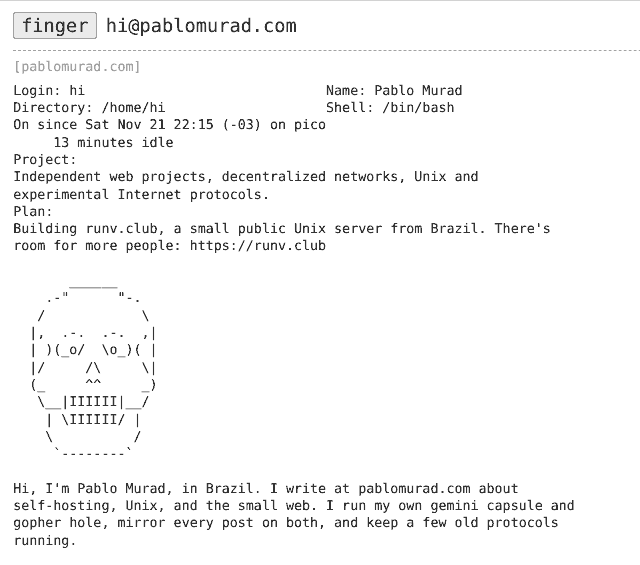
Without a terminal at hand, the web gateway at nullroute.lt shows the same page:
The daemon
Debian’s fingerd reads the classic ~/.plan and ~/.project files. I started with it, then swapped it for a short shell script, so it only answers for hi and I control the header.
inetd (from the inetutils-inetd package) starts the script for each connection. This is its line in /etc/inetd.conf:
finger stream tcp nowait nobody /usr/local/sbin/fingerd-hi-only
The script runs as nobody, reads the query line and builds the answer:
#!/bin/sh
export LC_ALL=C
PLAN=/var/finger/plan
ONLINE_MIN=90
read -r line 2>/dev/null || line=““
q=\((printf '%s' "\)line“ | tr -d ‘\r\n’ | sed ‘s#^/W##; s/^\[\[:space:\]]*//’ | awk ’{print tolower(\(1)}')
if MATHPH1XEND && MATHPH2XEND; then
printf 'This host publishes one Finger address: hi@pablomurad.com\\r\\n'
exit 0
fi
printf '%-38s %s\\n' "Login: hi" "Name: Pablo Murad"
printf '%-38s %s\\n' "Directory: /home/hi" "Shell: /bin/bash"
seen=\)(stat -c %Y “\(PLAN")
idle=\)(( (\((date +%s) - seen) / 60 ))
when=\)(date -d “@\(seen" '+%a %b %e %H:%M (%Z)' | tr -s ' ')
if MATHPH3XEND; then
printf 'On since %s on pico\\n' "\)when”
\[ "$idle" -ge 1 \] && printf ‘%d minutes idle\n’ “\(idle"
else
printf 'Last login %s on pico\\n' "\)when”
fi
printf ‘Project:\n’; cat /home/hi/.project
printf ‘Plan:\n’; cat /home/hi/.plan-top; printf ‘\n’; cat “\(PLAN"
A few details in there:
- An empty query (
Write a comment