Top Desktop Backgrounds in Animals Loyal Dogs of Classic Breeds Outdoors in Golden Hour in Ultra HD
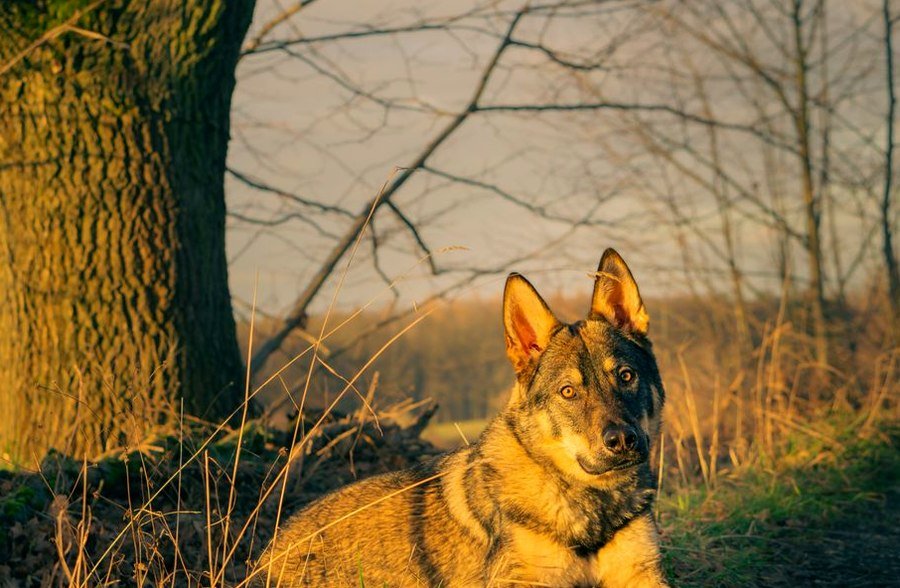
Top Desktop Backgrounds in Animals: Loyal Dogs of Classic Breeds Outdoors in Golden Hour in Ultra HD
The fastest route to a sharp dog wallpaper is a 3840x2400 file that you check against your monitor before you set it. Wallpapers4screen.com offers its animal images at that size as free downloads, so the real cost is your time. A five-minute workflow keeps you from scrolling for an hour and ending up with a cropped muzzle or a washed-out sky.
Start with your screen, then pick the dog
Open your display settings and write down the native resolution. A 3840x2400 image has a 16:10 shape, so it fits 16:10 laptop panels such as 2560x1600 with no cropping at all. On a 16:9 monitor at 3840x2160 the system trims 240 pixels of height, usually split between the top and bottom edges.
That trim decides which pictures work for you. If the dog’s ears touch the upper edge of the frame, a 16:9 screen will cut them off. Pick shots where the animal sits in the middle band, with sky or sand above and below.
Narrow the catalog before you scroll
The animals section of Wallpapers4screen.com runs to 309 pages, and browsing it without a plan eats an evening. Decide on a breed first. The catalog labels each image by breed name, so a Labrador Retriever, a Kerry Blue Terrier, a Keeshond, or a Toy Poodle is easy to spot in the listing.
Next, filter by scene with your eyes. Many of the outdoor dog images are set on a tropical beach with sea, sun lounger, and sunglasses, while others show a snowy forest with snowfall and bokeh. The catalog tags scenes by setting rather than by time of day, so for top desktop backgrounds in animals: loyal dogs of classic breeds outdoors in golden hour in Ultra HD you judge the light yourself. Look for a low sun, long shadows, and a warm amber tone on the coat.
Verify the file in three stages
A thumbnail hides flaws that a 4K panel will show, so run these checks in order.
- Open the full image and confirm the listed size reads 3840x2400 before saving, because a smaller preview will look soft once stretched.
- After the download, check the file properties on your computer and compare the pixel dimensions with the listing.
- View the picture at 100% zoom and inspect the eyes and fur, since blur there is the first thing you notice every morning.
Warm evening light creates one more practical problem. Bright sand or a glowing sky behind your icons makes white labels hard to read. Set the wallpaper, then look at the corner where your shortcuts sit. If the text disappears, choose a frame with darker ground on that side or move the icons.
Three common concerns
The first is cost. The catalog lists its images as free desktop downloads, and nothing is recalculated after the fact. The second is wasted time, which the breed-first search above cuts down to a few pages instead of hundreds.
The third is usage rights, and here caution pays. Personal use on your own desktop is the stated purpose of the site. If you plan to put an image in a client presentation, a shop display, or printed material, ask about permissions through the Feedback link first. A short message now is cheaper than replacing artwork later.
Checklist before you download
- Your monitor’s native resolution and aspect ratio are written down.
- You have chosen a breed, so the search stays short.
- The image shows low, warm sunlight and long shadows instead of flat midday glare.
- Head and paws sit away from the top and bottom edges if your screen is 16:9.
- The listing and the saved file both read 3840x2400.
- Icon labels stay readable over the brightest part of the picture.
- Any use beyond your own desktop has been cleared through the site’s Feedback form.
Once the list is ticked off, open the animals category on Wallpapers4screen.com, pick your breed, and test the first candidate at full zoom.
- Reference: https://wallpapers4screen.com/
Write a comment