Top Desktop Backgrounds in Cities Long Exposure Highway Light Trails Weaving Through Downtowns in
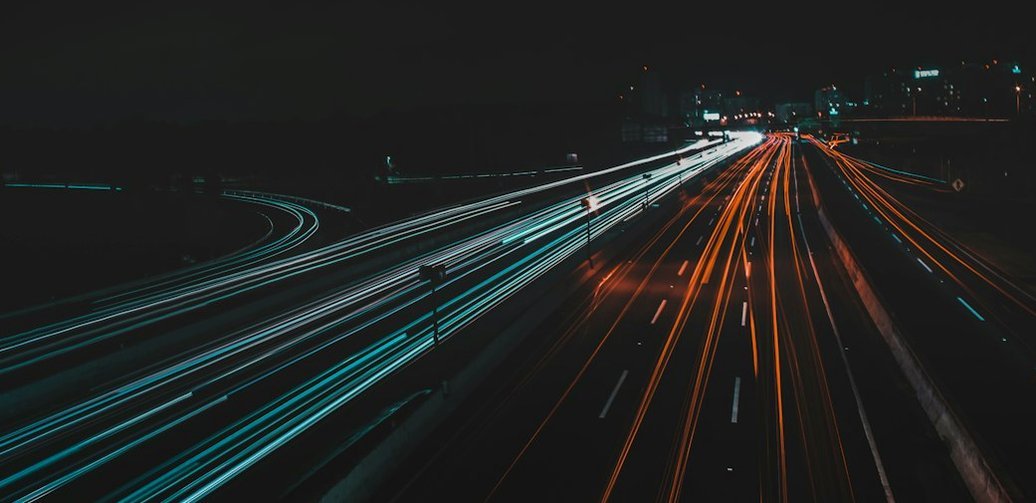
Top Desktop Backgrounds in Cities: Long-Exposure Highway Light Trails Weaving Through Downtowns in Ultra HD
City wallpapers with traffic light trails make effective desktop backgrounds because they bring together vivid color, architectural lines, and a distinct sense of place. The Wallpapers4screen cities collection includes free desktop images, with listed files reaching 3840x2400 and 4K resolution for large monitors.
For a highway-centered composition, look for bright road lines in the foreground with a darker downtown skyline behind them. This layout leaves the middle of the screen relatively open while traffic adds movement along the lower edge. It suits wide desktop layouts, particularly when icons are arranged on one side.
How to choose a city wallpaper for a desktop
Start with the resolution. A 3840x2400 image offers plenty of detail for a large display, although its ratio is taller than that of many modern widescreen monitors. Check how the operating system crops the image before applying it. A tight crop can remove important road, skyline, or tower details.
Color treatment often affects the atmosphere more than the city itself. Selective-color images present a mostly monochrome scene with one vivid subject, such as an orange Alfa Romeo in Milan or a red cable car in San Francisco. This approach works well when a single saturated color should stand out against a quieter background.
Scenes with trains, roads, and strongly illuminated routes create a livelier traffic effect. The collection includes a yellow U-Bahn train in Berlin and the green Tokyo Yamanote train. Neither replaces a true highway long exposure, but both use a similar visual structure: a bright transport line moving through an organized city scene.
Comparing visual styles for different screens
Travel-art wallpapers rely on recognizable landmarks and illustrated city forms. Washington, Athens, Cairo, Rio de Janeiro, Paris, Barcelona, and New York appear in creative poster or isometric treatments. Their simplified shapes stay readable behind folders and application windows, making them practical for busy workstations.
Selective-color photography delivers a sharper contrast. The Milan car, Paris red umbrella, San Francisco cable car, Berlin train, and Tokyo train each set a colored subject against a black-and-white environment. Choose this style when you want one obvious focal point instead of a dense skyline competing for attention.
Highway light-trail images work best when they have a low horizon, a visible direction of travel, and open space near the top or sides. A skyline filled with fine detail can make icons difficult to read. A darker upper section also keeps window titles and desktop labels more legible.
Where to browse the city collection
The category page brings the city wallpapers together, allowing you to compare photographic, illustrated, landmark, and transport-centered compositions before downloading. Browse Top Desktop Backgrounds in Cities: Long-Exposure Highway Light Trails Weaving Through Downtowns in Ultra HD, then open each preview to inspect its framing and resolution.
Use the listed dimensions as a practical filter. Images marked 3840x2400 are suitable for high-resolution desktop use, while 4K labels identify files intended for a sharper large-screen display. Because the collection is free, you can try several options without paying for a pack or subscription.
Picking a background by desktop setup
- Choose the highest-resolution preview for large monitors and check the crop around the skyline, road, or landmark.
- Select a darker composition with open space for a work desktop so icons remain easy to distinguish.
- Try selective-color photography for a colorful setup, such as the Paris red umbrella or Tokyo green train.
- Consider the illustrated Washington, Athens, Cairo, Rio de Janeiro, or Barcelona scenes for travel inspiration.
- Compare transport-centered images from Berlin and Tokyo with city scenes built around strong linear perspective for motion-focused styling.
A practical download and setup check
Open the preview, confirm the image dimensions, and download the original file instead of relying on a browser thumbnail. Set the picture to fill or fit based on the crop you prefer. Then move desktop icons away from the brightest light trails and the most detailed landmark areas.
If the first choice feels too busy, try a selective-color composition with one dominant subject. If it seems too static, switch to a transport scene with a clear route through the frame. Comparing those visual qualities can narrow the choice more quickly than browsing by location alone.
- Reference: https://wallpapers4screen.com/
Write a comment