Top Desktop Backgrounds in Animals Snow Leopards and Mountain Goats on Steep Alpine Cliffs in Ultra
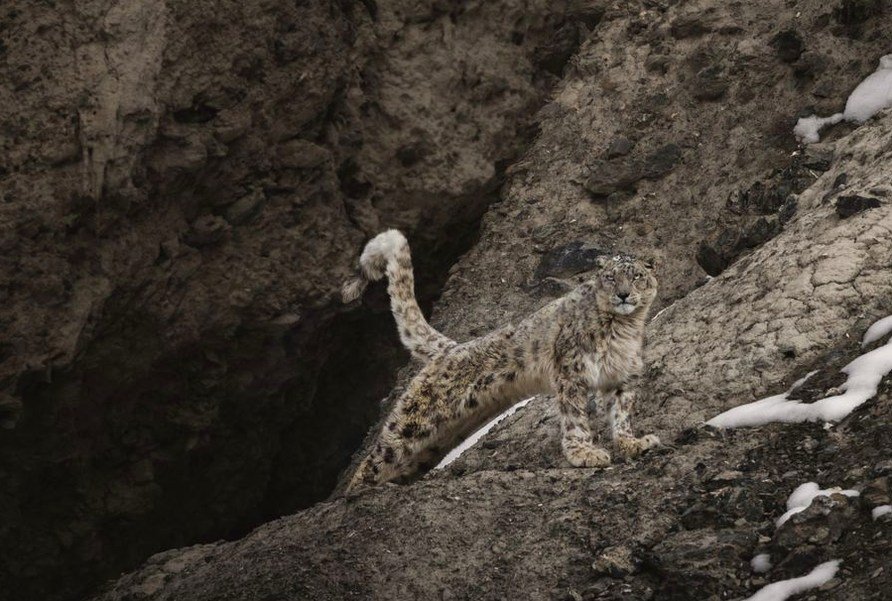
Top Desktop Backgrounds in Animals: Snow Leopards and Mountain Goats on Steep Alpine Cliffs in Ultra HD
For a desktop with an alpine wildlife theme, start with a high-resolution animal wallpaper that matches your screen shape and leaves enough open space for icons. The Wallpapers4screen animals category offers free desktop downloads, and the listed images include 3840x2400 files marked 4K. Snow leopard and mountain goat scenes should be checked directly in the category because the supplied catalog examples do not confirm those exact subjects.
What Makes an Alpine Animal Wallpaper Work
A strong snow leopard or mountain goat background needs more than a sharp animal portrait. Steep cliffs, snow fields, and distant ridges create depth, while a calm section of sky or rock keeps desktop icons readable. Images with the subject placed near one side usually work better than centered portraits because application shortcuts can occupy the opposite area.
The listed 3840x2400 resolution suits large desktop displays and gives you room to crop for different monitor proportions. A wide image can also remain clear when the operating system scales it to fit. Choose the original high-resolution file rather than a smaller preview, since compression becomes more visible across a large screen.
Snow Leopards Versus Mountain Goats
Snow leopard wallpapers suit viewers who want a quieter, more dramatic composition. The animal can blend into pale stone and snow, so contrast matters: a visible face, darker markings, or a clear ridge behind the body helps the subject remain recognizable after icons are placed over the image.
Mountain goat backgrounds usually create a brighter, more energetic desktop. The animal’s position on a narrow ledge can emphasize height, but excessive detail around the cliff may make text difficult to read. Look for a composition with a relatively even background behind the main icon area.
The difference is practical. A snow leopard image often works well for a minimal desktop with few shortcuts, while a mountain goat scene may suit a more active workspace if the rock textures do not compete with folders and application names.
Where to Find the Right File
The animal wallpaper section is the most relevant starting point for this theme. You can browse Top Desktop Backgrounds in Animals: Snow Leopards and Mountain Goats on Steep Alpine Cliffs in Ultra HD and inspect each preview before downloading. The category description promotes free desktop wallpapers in high quality, while the listed entries show a 4K label and a 3840x2400 size.
The current catalog excerpt includes several dog wallpapers, including winter scenes with snow, forests, snowfall, and snowy ground. Those examples confirm the section contains animal images and cold-weather compositions, but they should not be presented as snow leopard or mountain goat files. Check the individual title, preview, and resolution before saving an image for your desktop.
Choosing a Download for Your Monitor
Match the image to your display before making it the background. A 3840x2400 file has a 16:10 ratio, so it can fit wide desktop screens with limited cropping. On a 16:9 monitor, the system may trim some vertical content, which makes the position of the animal and cliff edge especially important.
- Use a full-resolution download when the wallpaper will cover a large monitor or multiple-screen workspace.
- Check the preview for empty space behind icons, taskbars, and widgets.
- Compare several alpine compositions before choosing a scene with the clearest animal silhouette.
- Keep the original file if you may change monitors later, since a larger image gives you more cropping flexibility.
For one desktop, downloading a single carefully selected file is usually the simplest option. If you are preparing several computers, save a small set of compatible images and label them by subject, resolution, and orientation. This avoids repeatedly opening previews when you need a different background later.
A Practical Selection Scenario
Suppose you are preparing wallpapers for three desktop monitors and want two alternatives for each screen. That means six image files, with each choice checked against the same 3840x2400 specification. Select three snow leopard or mountain goat compositions with open icon space, then keep three backups with different cliff layouts.
Because the files are offered as free downloads, the main cost is the time spent reviewing previews and organizing the selections. The exact download duration depends on the file size, connection, and device, and the available material does not provide a fixed timing estimate. A faster process comes from deciding the required resolution first, then rejecting previews that do not meet it.
Final Checks Before Applying the Wallpaper
Open the downloaded file at full size and inspect the animal’s face, fur, horns, cliff edges, and snow detail. Pixelation or heavy blur usually signals that the preview is being mistaken for the original image. Confirm that the image is saved locally before applying it, especially if the desktop will be used without an internet connection.
For a clean result, select the fit mode that preserves the animal’s proportions instead of stretching the scene. If icons cover the subject, try another crop or choose a composition with more open rock or sky. Start with the animals category, verify the exact snow leopard or mountain goat title, and download the 3840x2400 version that best matches your screen.
- Reference: https://wallpapers4screen.com/
Write a comment