How to Choose Dramatic Lightning Bolts Tearing Across Dark Night Plains for a Clean Desktop Setup
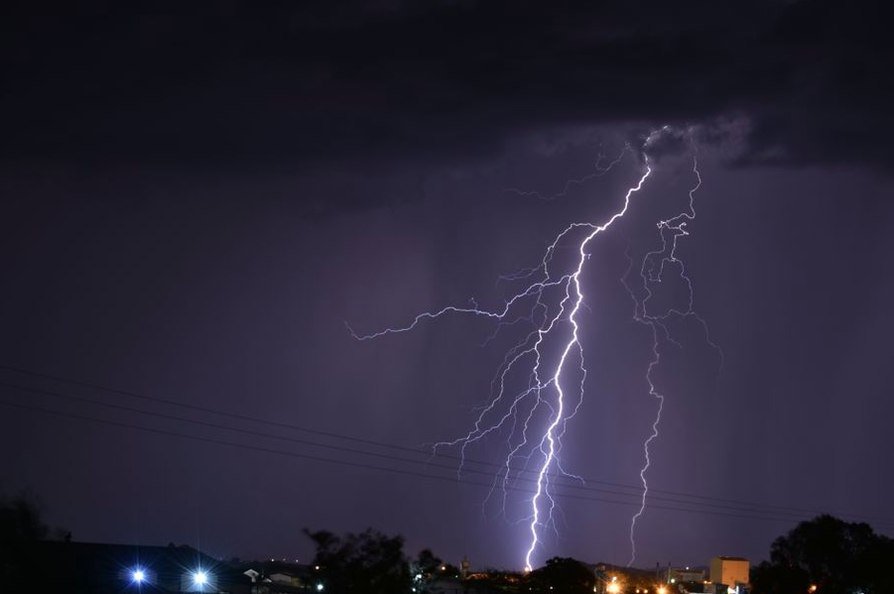
How to Choose Dramatic Lightning Bolts Tearing Across Dark Night Plains for a Clean Desktop Setup
Check the wallpaper’s preview, resolution, download source, and compatibility with desktop icons before saving it. The Wallpapers4screen nature catalog lists free 3840x2400 images, but the supplied collection does not specifically confirm that it contains a dramatic lightning scene. That distinction matters when you need a dark night plain instead of a generic landscape.
Verify the image before downloading
Start with the individual catalog page. Confirm that the image belongs to the nature category, carries a stated 3840x2400 resolution, and includes a direct download option. A page with only a thumbnail and no clear resolution can leave you with a soft image after scaling, particularly on a large monitor.
The catalog includes nature photographs and artwork featuring skies, trees, leaves, water, and other environmental subjects. These references establish the general visual range, but they do not prove that every requested subject is available. Inspect the preview for a visible lightning bolt, a sufficiently dark horizon, and open space where desktop icons can sit without obscuring the main subject.
You can review the category here: How to Choose Dramatic Lightning Bolts Tearing Across Dark Night Plains for a Clean Desktop Setup. Open the individual image page instead of relying on the category description. The catalog contains many different nature scenes across multiple pages, so the category view alone cannot confirm the composition you need.
Inspect the visual “warehouse” before accepting a file
A physical warehouse inspection does not apply to a downloadable wallpaper. The practical equivalent is a careful review of the full-size preview. Examine the clouds, plains, and horizon for retained detail in the dark areas. The lightning should look sharp without becoming an oversized white streak behind your shortcuts.
Check how the image fits your monitor’s aspect ratio. The listed 3840x2400 format uses a 16:10 proportion, while a 16:9 screen may crop part of the top or bottom. Set the image temporarily as your desktop background and see whether the bolt crosses the icon area. If it does, use a version with darker negative space along the left or right side, when the catalog provides one.
Blue skies, spruce branches, snowy pines, autumn leaves, and palms can look attractive in a thumbnail, yet they do not suit a stormy night theme. Exclude those images when the goal is a high-contrast lightning composition. This screening step prevents a download that meets the resolution requirement but misses the intended mood.
Reinforce the digital package
For a wallpaper, package reinforcement means protecting the original file during download and transfer. Use the offered full-resolution download instead of saving a compressed browser preview. A preview may contain fewer pixels, which can produce blur when stretched across the desktop.
Keep the downloaded file in its original format and create a backup before making edits. Repeated format conversions can reduce fine cloud texture and soften the lightning’s edge. If you adjust the brightness, save the edited version separately so the original remains available for another monitor or workspace.
For a clean setup, prepare two versions: one showing the full storm scene and another with reduced brightness behind the icons. The darker version can improve text legibility without changing the source image. Use a clear filename that records the subject and resolution, such as «dark-night-lightning-3840x2400», if the image genuinely matches those features.
Consolidate a batch of wallpapers
Batch consolidation is useful when you are selecting several backgrounds for workstations or rotating images on one computer. Download files only after they pass the same checks: a clear subject, a usable crop, a stated 3840x2400 resolution, and enough open space for icons.
- Place storm scenes in one folder, separate from autumn, forest, palm, and environmental images.
- Remove duplicates and thumbnails so the rotation does not display lower-quality copies.
- Rename files consistently while keeping the original subject and resolution visible.
- Preview every selected image at desktop size before adding it to the rotation.
This arrangement reduces clutter and makes later replacement easier. It also keeps bright, crowded, or unrelated images from entering a batch intended for a dark night theme.
Acceptance checklist for a clean desktop
- The individual page confirms a free download and clearly shows the selected image.
- The file is listed at 3840x2400 or another resolution suitable for your monitor.
- A visible lightning bolt crosses a dark plain if that exact subject is required.
- The crop leaves enough quiet space for desktop icons and labels.
- The downloaded file is the full-resolution original rather than a small preview.
- The final batch contains verified images with consistent filenames and quality.
Begin with the nature category, inspect each individual preview, and download only an image that meets every item on the checklist.
- Reference: https://wallpapers4screen.com/
Write a comment