Milky Way Over Mountain Lakes Night Sky Magic on Wide Displays
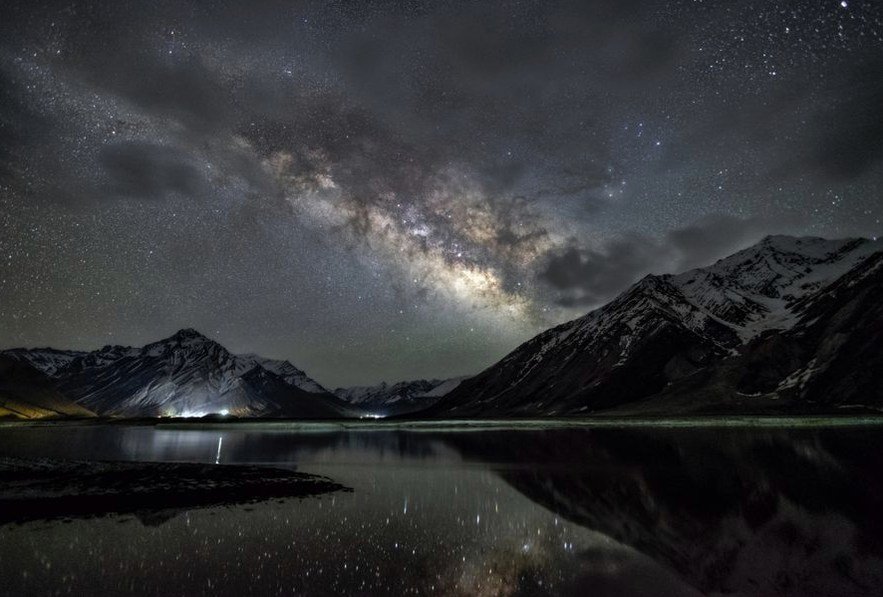
Milky Way Over Mountain Lakes: Night-Sky Magic on Wide Displays
For a wide desktop display, a 3840x2400 space wallpaper gives the Milky Way scene enough room for stars, dark sky, and mountain silhouettes. Wallpapers4screen lists free high-quality space images in 4K resolution, but the available description does not confirm that every image shows a mountain lake. Preview each file carefully before adding it to your final collection.
The page is useful when you want a large astronomy-themed background without paying for a download. Its catalog includes space, universe, galaxy, stars, and astronomy artwork, with the first page marked as part of a 35-page collection. That makes source checking and file selection more important than downloading the first image that matches a broad search phrase.
How to verify the right wallpaper
Start with the image preview, not the keyword list. The catalog description includes many solar-system illustrations, orbital diagrams, planets, and abstract astronomy designs, while your target look requires a darker landscape composition with a visible sky and water foreground.
- Check whether the preview actually includes a mountain lake, rather than planets or a 3D solar-system diagram.
- Confirm the listed resolution reads 3840x2400, because that format supplies enough pixels for a large desktop canvas.
- Inspect the crop for empty areas where desktop icons can sit without covering the Milky Way or mountain ridge.
- Look for a clean, sharp preview before downloading so you do not build a collection around an unsuitable image.
The page title describes free space wallpapers for desktop use, and the catalog identifies 4K files at 3840x2400. Those facts support a wide-display workflow, but they do not guarantee a specific artistic subject, color palette, or licensing arrangement beyond the page’s free-download presentation.
Inspect the file before building a batch
A careful inspection prevents a mismatched wallpaper set. Open the downloaded image at full size and check for compression marks, blurred stars, visible seams, or a stretched horizon. These defects become more obvious when the image fills a large monitor.
Keep the original file unchanged. Create a working copy only after checking its dimensions and appearance, then use a consistent filename such as milky-way-mountain-lake-3840x2400. This simple step keeps related images together and makes it easier to remove duplicates later.
If you are collecting several backgrounds, consolidate them into one clearly named folder. Separate landscape scenes from planetary artwork and abstract space designs. A small, verified batch is easier to manage than a large folder filled with images that only partially match the intended theme.
Choosing a display-ready collection
For a calm night-sky set, select images with similar contrast and composition. A bright planetary illustration may be technically suitable for a desktop but look out of place beside a dark lake landscape. Matching visual weight helps the collection feel deliberate when wallpapers rotate.
Use the space category to browse related material, including Milky Way Over Mountain Lakes: Night-Sky Magic on Wide Displays. The category contains space-focused material, yet each candidate still needs a visual check because the catalog description covers many different astronomy styles.
Wide displays can expose weak image preparation. A file that looks crisp in a small preview may show softness across a large screen, especially around stars and mountain edges. Compare the preview with the downloaded file before placing it into the approved batch.
Packaging reinforcement for digital downloads
Digital files do not need physical packaging, but they still benefit from a controlled handoff. Keep the original download in a source folder, store edited copies separately, and avoid repeatedly saving the same image in formats that reduce quality.
If you transfer the collection between computers, use one archive with clear filenames and a short text note listing each image’s resolution. This protects the approved batch from accidental mixing and makes future replacement easier when a file does not suit the display.
Do not describe a wallpaper as a confirmed mountain-lake scene unless the preview shows that subject. The available page information confirms space imagery, desktop use, free downloads, and 3840x2400 files; the landscape details must come from the individual image itself.
Acceptance checklist
- Preview confirms a mountain lake and night-sky composition.
- File resolution is 3840x2400.
- Stars, shoreline, and mountain edges remain sharp at full size.
- Desktop icons will not cover the main visual area.
- Filename identifies the subject and resolution.
- Approved images sit in one consolidated folder.
- Planetary and abstract designs remain separated from landscape wallpapers.
- The final batch contains only files that passed visual inspection.
Open the space category, compare the previews, and download only the 3840x2400 images that meet this checklist.
- Reference: https://wallpapers4screen.com/
Write a comment