How to Choose Black Ravens Contrasted Against Stark Winter Snow for a Clean Desktop Setup
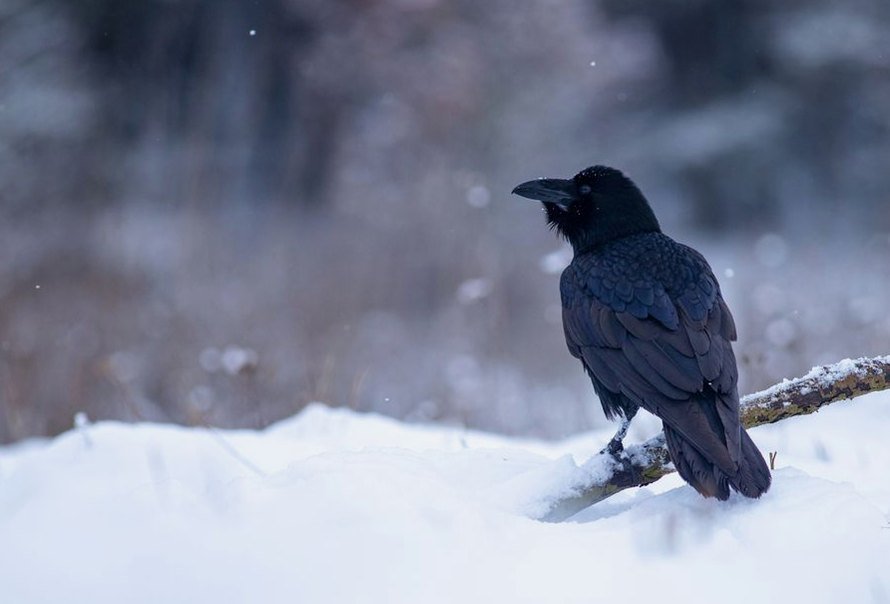
How to Choose Black Ravens Contrasted Against Stark Winter Snow for a Clean Desktop Setup
Pick an image with one raven placed off-center, at least two-thirds of the frame filled with untouched snow, and a source file of 3840x2400 pixels. That combination keeps icons readable, survives cropping on any common monitor, and stays sharp on a 4K panel. Wallpapers4screen.com offers its bird wallpapers at that resolution as free downloads, so the only real cost is the few minutes you spend choosing well.
Why one bird beats a flock
A black raven on white snow is close to a two-tone image. Your eye lands on the bird first, and the rest of the screen reads as empty space. That empty space is what makes a desktop feel clean, because folders and shortcuts sit on a flat field instead of fighting with detail.
A flock scatters dark shapes across the frame, and every one of them competes with your icons. Choose a single bird, or a pair at most. Check which side it sits on, too. If your icons line up on the left, the raven belongs on the right third of the picture.
The route from download page to your screen
A wallpaper travels a short route, and quality can be lost at each stop. The file leaves the site at full size and lands in your downloads folder. Your operating system then scales and crops it to fit the display.
The first stop is the catalog. The birds section on Wallpapers4screen.com runs 17 pages, and the first page leans toward bald eagles, hawks, owls, and macaws. Many of those are 3D art on black backgrounds, which is the opposite of the look you want. Browse past them with a clear filter in mind, which is the practical side of how to choose black ravens contrasted against stark winter snow for a clean desktop setup. Skip anything tagged as crystal or gem art and look for natural winter photography with a pale, even background.
The second stop is the file itself. Download the full 3840x2400 version, not a preview thumbnail saved from the listing. Snow is unforgiving, and compression blocks that would hide in a jungle scene show up clearly in a smooth white gradient.
How the image arrives on different monitors
A 3840x2400 file has a 16:10 shape. On a 2560x1600 or 1920x1200 display it scales down evenly, and nothing is cut. On a 16:9 screen at 3840x2160, the system trims 240 pixels of height, usually split between top and bottom.
That trim matters for composition. A raven perched at the very bottom edge may lose its feet or its branch. Before you commit, set the fit mode to “Fill” and look at the edges. If the bird sits too close to one, choose another image instead of stretching this one.
Ultrawide monitors crop far more aggressively, so a tall composition with sky above the bird will lose most of that sky. For those screens, pick a frame where the raven sits near the vertical middle. Dual-monitor users get a cleaner result by putting the raven on one screen and a plain snow image on the other.
Three objections worth answering
The first is cost. The downloads are free, so the budget question disappears, and you can test five candidates without spending anything.
The second is sharpness. A 4K-class source covers every mainstream display at native resolution or above. Scaling down keeps detail, while scaling up from a small file produces soft feathers and gray, muddy snow.
The third is readability, and here the snow has a real weakness. Icon labels are usually white with a thin shadow, and they fade against a bright background. Solve it by choosing a photo with slightly blue or gray snow, such as an overcast scene. Dark mode for the taskbar also helps, since it echoes the raven and frames the white field.
A quick test before you keep it
- Set the image as wallpaper and step back about three feet from the screen.
- Read your icon labels from that distance, and reject the image if any are hard to make out.
- Open and close a window to see whether the raven still draws the eye without pulling attention from your work.
- Lower the screen brightness to evening level and confirm the snow does not glare.
Open the birds category on Wallpapers4screen.com, shortlist three winter frames, and run this test on each. Which side of your screen is free of icons right now, so you know where the raven should sit?
- Reference: https://wallpapers4screen.com/
Write a comment