How to Choose Motocross and Enduro Riders Launching over Dusty Jumps for a Clean Desktop Setup
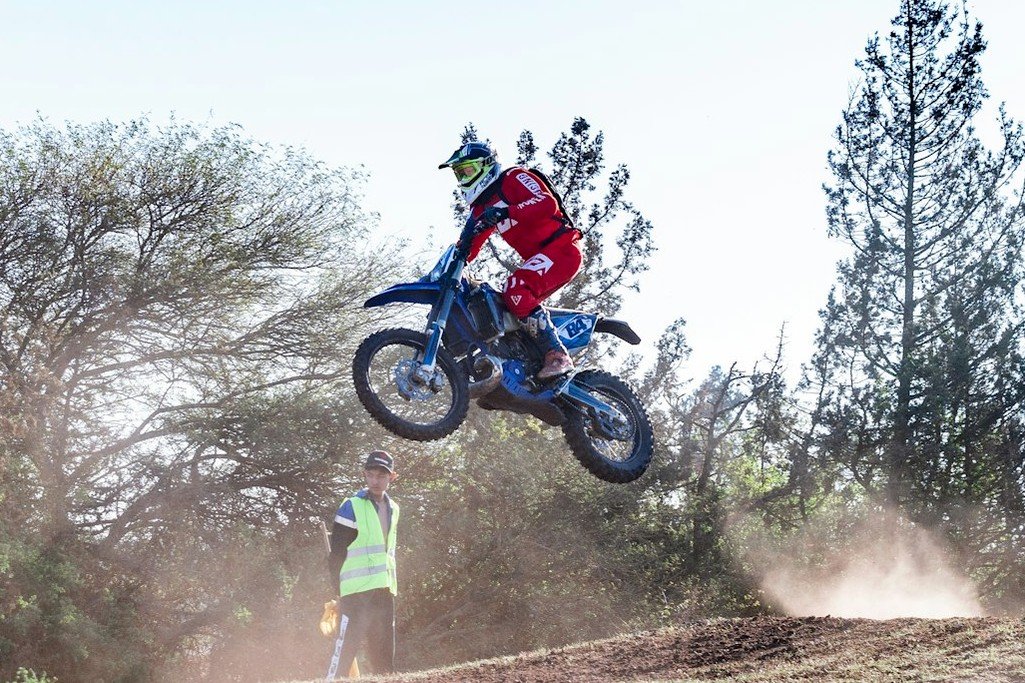
How to Choose Motocross and Enduro Riders Launching over Dusty Jumps for a Clean Desktop Setup
A motocross or enduro wallpaper works on a clean desktop when its composition, resolution, and action direction match your screen. The motorcycle wallpaper collection includes free desktop images in 3840x2400 resolution, so large displays can show dusty jumps and airborne riders without relying on a small, blurry file.
How you plan to use the images decides the rest. One dramatic action shot works well as a permanent background. A small batch gives you a rotating set for workstations, gaming PCs, or multiple monitors.
Choose the right action composition
A rider launching over a jump needs open space around the motorcycle, because that space keeps desktop icons from covering the helmet, front wheel, or landing line. Look for images with the rider positioned to one side and dust trailing behind the bike rather than filling the entire frame.
Enduro scenes often include uneven terrain, trees, rocks, and deeper shadows. The result looks more natural and outdoorsy, but the darker areas can reduce text contrast. Motocross images with a pale dirt track and a clear sky usually suit desktops where many shortcuts stay visible.
- A side-profile jump keeps the motorcycle silhouette easy to recognize.
- Pick a front three-quarter angle when the rider should be the visual focus.
- Wider scenes leave room for icons to sit away from the landing area.
- Skip tightly cropped images if the desktop has several rows of shortcuts.
Compare wallpaper sizes before downloading
The listed 3840x2400 files are a practical starting point for large desktop screens. A high-resolution image gives you more room to crop, which helps when the original composition does not match your monitor’s shape.
On a single monitor, download one image with a clear focal point and test it behind your normal icons. If the rider’s helmet or front wheel ends up under shortcut labels, choose another composition instead of shrinking the image aggressively.
Multi-monitor users should compare several related scenes before downloading a batch. A single image stretched across screens can place the rider between display bezels. With separate wallpapers, the motorcycle stays visible on one panel and the dust trail on another.
Compare download approaches for different batches
For one or two wallpapers, picking directly from the motorcycle category is the simplest route. You can inspect the preview, open the chosen image, and save the original file without building a large collection first.
A larger batch suits anyone who changes backgrounds regularly. The catalog identifies models, riding styles, and visual themes, so you can create folders for bright action scenes, darker garage-style images, and outdoor off-road compositions.
Use the How to Choose Motocross and Enduro Riders Launching over Dusty Jumps for a Clean Desktop Setup category page to compare motorcycle images before saving them. Wallpapers4screen.com lists the collection as free for desktop use, and the available image dimensions help you filter candidates for larger screens.
A realistic batch calculation
Suppose you want a 12-wallpaper rotation for one desktop. Select four bright motocross jumps, four dusty enduro scenes, and four darker motorcycle images for evening use. That gives you three visual groups, so the desktop does not show the same color balance every day.
Save the files in three folders with four images each: 4 images multiplied by 3 themes equals 12 backgrounds. Download time in the browser will depend on your connection and the files you select.
For a smaller setup, choose three images instead: one bright jump, one wide trail scene, and one darker action frame. That batch takes less storage and makes manual rotation easier, while the 12-image set gives more variety across a workweek.
Keep the desktop readable after installation
Test every wallpaper with the same icon arrangement you use for work. A dusty background can hide white labels, and a bright sky can make dark labels difficult to read. Move icons to the quieter side of the image, or choose a scene with open ground behind the shortcuts.
The catalog preview alone is not enough to judge a wallpaper. Open the full-resolution file and inspect the rider’s position, dust contrast, and empty areas around the subject. Wallpapers4screen.com includes model and scene descriptions, which makes it easier to compare options without downloading every candidate.
Start with three images if you want a quick test. If the composition remains clear across your monitor and icons stay readable, expand the set to 12 files and organize the rotation by brightness or riding style.
- Reference: https://wallpapers4screen.com/
Write a comment