How to Choose Industrial Loft Apartments with Brick Walls and Tall Windows for a Clean Desktop Setup
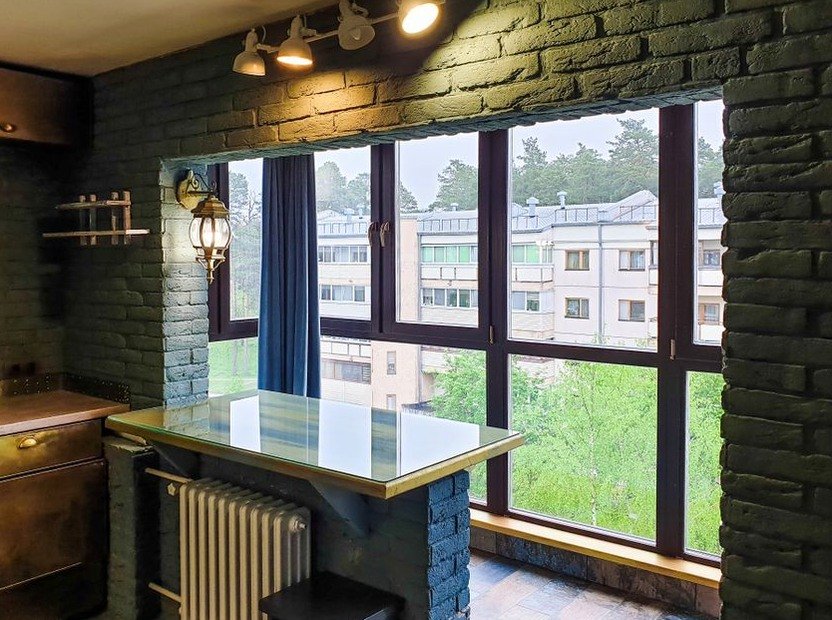
How to Choose Industrial Loft Apartments with Brick Walls and Tall Windows for a Clean Desktop Setup
Finding a workspace that matches your aesthetic preferences requires evaluating specific architectural traits, natural light availability, and structural finishes. Setting up a minimal workspace demands clean sightlines, unobstructed wall segments, and reliable cable concealment options, especially when dealing with raw architectural elements. Selecting the right background for your monitor array and peripherals prevents visual clutter and protects your focus during long remote work sessions.
Brick walls and high vertical glass panels introduce unique lighting conditions that affect screen glare and camera angles during video calls. Natural illumination changes throughout the day across large expanses, meaning you need to position your desk to manage direct sunlight reflection on your displays. Exposed masonry surfaces also dictate how you mount accessories, route power cables, or anchor shelving units without damaging historic or structural materials.
Layout flexibility matters because open-concept living areas lack standard interior dividers for partitioning a dedicated computer zone. You must verify that the room provides adequate power outlets near the window line to avoid running hazardous extension cords across high-traffic walking paths. Ceiling height directly influences acoustic performance, so hard concrete surfaces or brick walls may require subtle sound dampening to eliminate echo during virtual meetings.
For those gathering visual inspiration before committing to a physical move or redesign project, you can browse interior options through resources like How to Choose Industrial Loft Apartments with Brick Walls and Tall Windows for a Clean Desktop Setup to compare various layouts and lighting setups. Examining high-resolution digital references helps visualize how dark wood furniture, black metal fixtures, or concrete textures interact with morning and afternoon light.
Evaluating Architectural Textures and Desk Placement
Raw concrete and exposed brick provide striking visual depth behind a monitor, but their uneven surfaces complicate traditional desk mounting. Choosing a spot with flat masonry piers or smooth concrete pillars allows your standing or sitting desk to sit flush against the boundary without wobbling. You should inspect the condition of the mortar joints to ensure crumbling dust does not settle onto sensitive electronic components or mechanical keyboards.
Managing natural light requires calculating the sun’s trajectory relative to your primary monitor orientation. South-facing tall windows flood the interior with intense brightness that washes out IPS panels unless you install diffusing roller shades or adjustable blinds. Positioning your desk perpendicular to the glass source minimizes direct glare while maintaining a bright, balanced environment for daily tasks.
Managing Cable Routing and Power Access
Open floor plans often place structural pillars far away from standard wall outlets, creating immediate challenges for clean desktop cable management. Floor-mounted power boxes or heavy-duty cord channels protect wires from foot traffic while keeping power strips hidden from view. Selecting an apartment with accessible baseboard channels simplifies the process of routing Ethernet cables and monitor power supplies toward the main work surface.
Industrial interiors frequently utilize exposed metal conduit or rigid steel beams that can double as vertical pathways for low-voltage wiring. Planning your desk layout around these existing architectural features eliminates the need for permanent wall drilling, which is often prohibited in leased loft spaces. Keeping power supplies elevated off concrete floors also prevents moisture accumulation during seasonal humidity shifts.
Frequently Asked Questions
How do tall windows affect screen visibility in a loft apartment?
Direct sunlight creates severe glare on computer screens unless you use matte display filters or install light-diffusing window shades. Positioning your desk sideways to the window eliminates harsh backlighting and front reflections.
Can I mount monitors directly onto exposed brick walls?
Drilling into old masonry requires specialized masonry bits and heavy-duty anchors to prevent structural crumbling. Many remote workers prefer using heavy desk-clamp monitor arms to protect historic brick surfaces.
What flooring works best under a rolling office chair in a concrete loft?
Polished concrete or hard timber floors suffer from scuff marks and caster wear over time. Placing a low-pile office mat underneath your chair protects the surface and ensures smooth movement.
How do I minimize echo in an industrial workspace with high ceilings?
Large open areas with concrete walls and glass panes bounce sound waves easily, creating distracting room reverberation. Adding area rugs, fabric curtains, and acoustic wall panels absorbs excess noise during conference calls.
- Reference: https://wallpapers4screen.com/
Write a comment