Best 4K Cities Wallpapers Nighttime Tokyo Glowing with Neon Signs and Wet Street Reflections
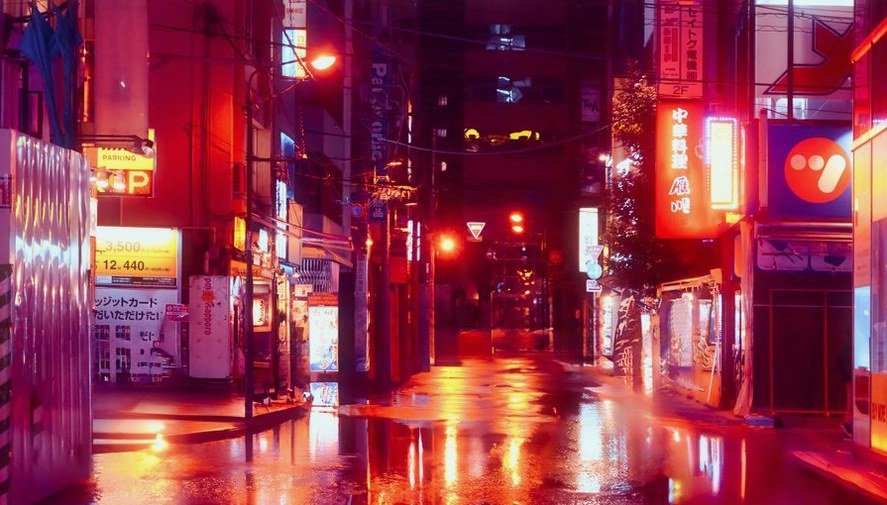
Best 4K Cities Wallpapers: Nighttime Tokyo Glowing with Neon Signs and Wet Street Reflections
A night shot of Tokyo with neon signs and rain-slick pavement needs a source file of at least 3840 pixels across, or the fine detail turns to mush. Wallpapers4screen.com publishes its cities category at 3840x2400 and offers every file as a free download. That size covers a 4K monitor with pixels to spare, so the only real decision is how the image gets cropped for your screen.
Why neon and wet asphalt punish low resolution
Neon scenes are built from small, bright shapes on a dark field. Sign lettering, window grids, and umbrella edges each occupy only a few pixels. When a 1920-pixel file is stretched over a 4K panel, every one of those pixels is doubled, and thin strokes blur into glowing smudges.
Reflections make the problem worse. A puddle holds a distorted copy of the sign above it, with softer edges and lower contrast. Upscaling flattens that subtle gradient first, so the street ends up looking like a colored stain. A native 3840-wide file keeps the reflection readable as a reflection.
How one 3840x2400 file fits four common screens
The file has a 16:10 shape, which is slightly taller than most monitors sold today. That extra height is useful, because it gives you room to choose what to trim.
- On a 16:10 laptop or a 1920x1200 monitor, the image fits edge to edge, and the smaller panel shows it at exactly half scale with nothing cut.
- A 3840x2160 monitor uses the full width at native sharpness and trims a thin strip of sky or pavement.
- Ultrawide 3440x1440 panels scale the picture down a little and remove about a third of its height.
- Phones in portrait orientation keep the full height but show only a narrow vertical slice of the street.
For a 16:9 or 16:10 desktop, this file is the better choice over any smaller download, and it needs no editing. Ultrawide owners should pick compositions where the signs sit in a horizontal band through the middle. Phone users get the best result from scenes with one strong vertical subject, such as a single lit tower or alley.
Where to look in the catalog
The cities category runs to 269 pages, and Tokyo appears in more than one style. The first page already carries a selective color shot of the green JR Yamanote Line train, rendered in black and white with a single color left in. It suits a desk setup where a full neon palette would fight with your icons. Readers hunting for the Best 4K Cities Wallpapers: Nighttime Tokyo Glowing with Neon Signs and Wet Street Reflections should page deeper into the same category and check each preview for readable sign lettering before downloading.
A worked example with three screens
Suppose a home office has a 3840x2160 monitor, a 2560x1440 second display, and a 16:10 laptop. One download from Wallpapers4screen.com has to serve all three.
The main monitor shows the image at native width. Its height is 2160, so 2400 minus 2160 leaves 240 pixels to remove, or 120 from the top and 120 from the bottom. That is 10% of the picture, and in a street scene it usually costs some dark sky and a strip of foreground pavement.
The second display scales the file by two thirds, giving 2560x1600. Trimming 160 pixels brings it to 1440, the same 10% loss. The laptop shows the whole frame untouched. So the reflections in the lower third survive on all three screens, as long as the puddles do not sit in the bottom 5% of the frame.
Two common doubts before downloading
The first doubt is cost. The catalog labels its wallpapers as free desktop downloads, so comparing several Tokyo scenes side by side costs nothing but a few minutes.
The second is whether a dark image will look gray on an ordinary monitor. That depends on the panel, but the file can help. Choose a scene where the neon covers a good share of the frame, because large black areas expose backlight glow on LCD screens. OLED owners can go the other way and pick the darkest frame available.
Setting it up in two minutes
- Check your display resolution in system settings and note whether the shape is 16:9, 16:10, or wider.
- Open the cities category and pick a Tokyo scene whose signs and reflections sit away from the edges your screen will trim.
- Download the 3840x2400 file and set the wallpaper mode to fill, so the system crops instead of stretching.
- Look at the sign lettering from normal sitting distance and swap the image if the text is cut off.
Start with your main monitor’s numbers, open the cities category, and test one Tokyo night scene against the crop math above before you download a whole set.
- Reference: https://wallpapers4screen.com/
Write a comment