Top Desktop Backgrounds in Birds Black Ravens Contrasted Against Stark Winter Snow in Ultra HD
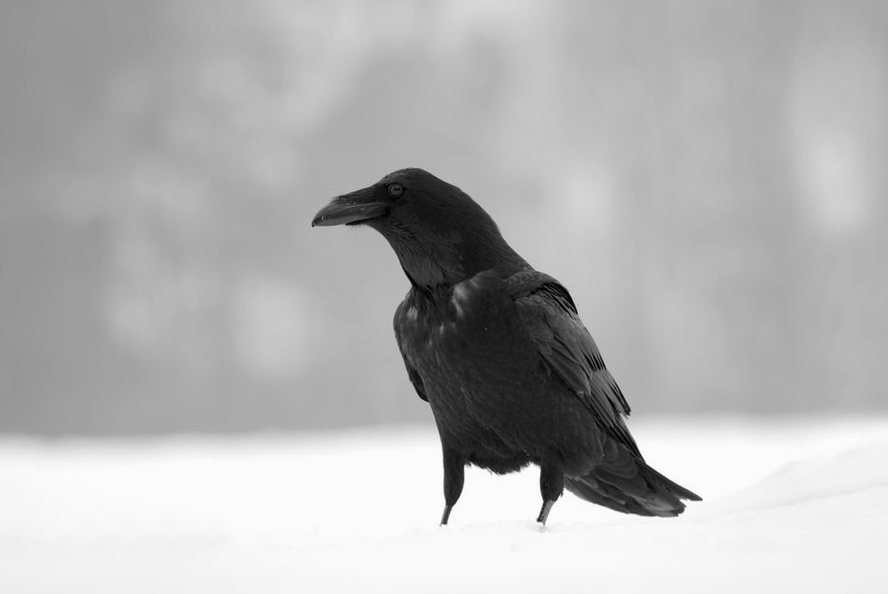
Top Desktop Backgrounds in Birds: Black Ravens Contrasted Against Stark Winter Snow in Ultra HD
A sharp raven wallpaper against clean winter snow requires more than selecting the darkest thumbnail. Check the image dimensions, inspect the preview for compression, and make sure the composition suits your screen before downloading. The birds category offers free desktop wallpapers, with several images published at 3840x2400. Begin with the resolution, then review the full-size file before setting it as your background.
Start with the visual brief
Decide on the intended look before opening several download pages. The subject should be a black raven or another dark bird silhouette, while the background needs enough white snow to create clear tonal contrast. A pale, uncluttered scene keeps desktop icons readable and helps the bird remain distinct from a distance.
The catalog includes birds of prey, dark backgrounds, hawks, owls, and eagle artwork. It does not establish that every listed image shows a raven in winter snow. Use the phrase as a search brief, then verify each preview instead of assuming that a generic bird image matches the target.
Verify the preview before downloading
Open the image preview at its largest available size. Examine the bird’s outline, the snow texture, and the areas around the wings and feathers. Heavy halos, blocky shadows, or blurred snow can make an image look poor when it fills a large monitor.
Compare the composition with your desktop layout. A raven near the center may sit behind application windows, while a subject placed toward one side can leave more usable space for icons. Bright snow may also reduce the contrast of white icons, so inspect the image with a few typical shortcuts visible.
Confirm the file dimensions
Choose the 3840x2400 version when your display and operating system can use it. The larger file gives you more room to crop for different desktop shapes, although it may require additional storage and a longer download. Do not replace the full file with a smaller preview simply because the thumbnail looks clear.
Keep the original proportions during the first test. Stretching the bird or narrowing a snow-covered horizon can make the subject look unnatural. If your screen uses a different aspect ratio, crop from the least important edge rather than distorting the entire image.
Use the birds category efficiently
The Top Desktop Backgrounds in Birds: Black Ravens Contrasted Against Stark Winter Snow in Ultra HD search path works best when you compare thumbnails by subject, contrast, and resolution. Build a shortlist of images with a clearly visible dark bird, enough snow around it, and no distracting decorative elements.
Several catalog entries feature dramatic birds of prey, dark backdrops, or stylized artwork. These options may suit a high-contrast desktop, but they differ from a natural raven in snow. Read the image title and inspect the file before treating any entry as a match.
Prevent download and payment mistakes
Use the site’s free desktop download wording as the baseline. A payment request, forced subscription, or unexpected checkout page does not match the stated free-download offer. Stop and verify the page before entering card details.
Save the downloaded file with a clear name that includes the subject and dimensions. Scan it with your normal security software, then open it locally before applying it as the desktop background. This helps identify incomplete downloads and prevents a damaged file from replacing your current wallpaper.
Short checklist before payment
- Confirm that the preview actually shows a black raven or the intended dark bird.
- Check for stark winter snow and enough empty space for desktop icons.
- Verify that the file reads 3840x2400 when that size suits your display.
- Open the full file locally and inspect feather edges, snow detail, and compression.
- Confirm that the download remains free before entering payment information.
After these checks, apply the image and review it at your normal screen brightness. If the bird blends into the background or the snow overwhelms the desktop, return to the category and choose a preview with better balance.
- Reference: https://wallpapers4screen.com/
Write a comment