How to Choose Bright Sunflowers and Wild Daisies under Warm Summer Light for a Clean Desktop Setup
How to Choose Bright Sunflowers and Wild Daisies under Warm Summer Light for a Clean Desktop Setup
Pick a sunflower or daisy image at 3840x2400, with the flower off to one side and a soft, blurred background behind your icons. That combination keeps the picture sharp on a 4K panel and leaves your shortcuts readable. Wallpapers4screen.com offers its flower wallpapers for desktop as free downloads, so the only real cost is the few minutes you spend choosing well.
Sunflowers or daisies for your screen
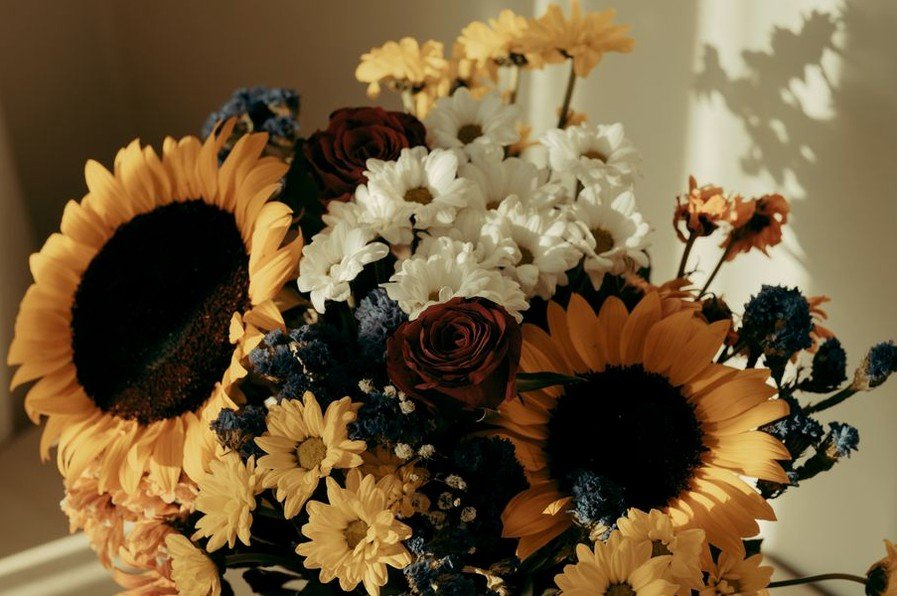
Sunflowers carry heavy yellow and orange tones. They warm up a dark room and a black monitor bezel, but they also fight with yellow folder icons. If your desktop holds more than a dozen shortcuts, a full-frame sunflower will make them harder to find.
Wild daisies behave differently. White petals over green grass give a lighter, cooler field with small points of detail, so icon labels stay legible across most of the frame. For a work machine with a busy desktop, daisies are the better choice. Sunflowers suit a desktop you keep nearly empty.
Close-up, macro, and bokeh shots
The flowers category labels its images with terms such as close-up, macro, and bokeh, and those tags tell you how the image will behave behind your windows.
- A close-up with bokeh shows one or two blooms in focus and melts the rest into color, which leaves calm space for icons.
- Macro shots fill the frame with petal texture, so they look striking on an empty desktop and cluttered on a full one.
- Bouquet compositions put detail everywhere, and they work best when your taskbar holds everything you launch.
Warm summer light adds one more variable. Golden backlight lowers contrast in the bright half of the picture, so white icon text can vanish there. Choose a frame where the glow sits on the side opposite your icon column.
Where to look in the catalog
The flowers section runs to 158 pages, and its first page leans toward tulips and bridal rose bouquets. Sunflowers and daisies sit deeper, so plan to page through instead of taking the first yellow image you see. Yellow tulips in macro are a reasonable stand-in if you want the same warm palette with a tidier shape. The category page works as a hands-on companion to How to Choose Bright Sunflowers and Wild Daisies under Warm Summer Light for a Clean Desktop Setup, because every listing shows its resolution and tags before you download.
Two objections worth answering
Free downloads often mean small, compressed files. Here the listed size is 3840x2400, which exceeds the pixel count of a standard 4K monitor, so the image is scaled down and never stretched.
The second worry is cropping. A 3840x2400 file has a 16:10 shape, while most monitors are 16:9, so some of the picture will be trimmed. The amount is predictable, and you can check it before you commit to an image.
A hypothetical fit calculation
Suppose you have a 27-inch monitor at 2560x1440 and a daisy close-up at 3840x2400. Scaling the width from 3840 to 2560 means multiplying by 0.667, which brings the height to 1600 pixels. Your screen shows 1440 of them, so 160 pixels are cut, or 80 from the top and 80 from the bottom.
On a 3840x2160 panel the same image loses 240 pixels of height, 120 from each edge. In both cases that equals 10% of the picture. On a 16:10 laptop at 1920x1200, the file scales by exactly half and nothing is cropped.
The practical rule follows from the numbers. Skip any image where a petal tip or the horizon sits within the outer 5% at the top or bottom. Set the wallpaper mode to fill, since stretch would distort round flower heads.
Your next step
Open the flowers category on Wallpapers4screen.com, shortlist three images with blurred backgrounds, and run the crop math for your own resolution. Then set each one for a day and keep the image where you can still read every icon label at a glance.
- Reference: https://wallpapers4screen.com/
Write a comment