How to Choose Rooftop City Panoramas and Suspension Bridges at Golden Hour for a Clean Desktop Setup
How to Choose Rooftop City Panoramas and Suspension Bridges at Golden Hour for a Clean Desktop Setup
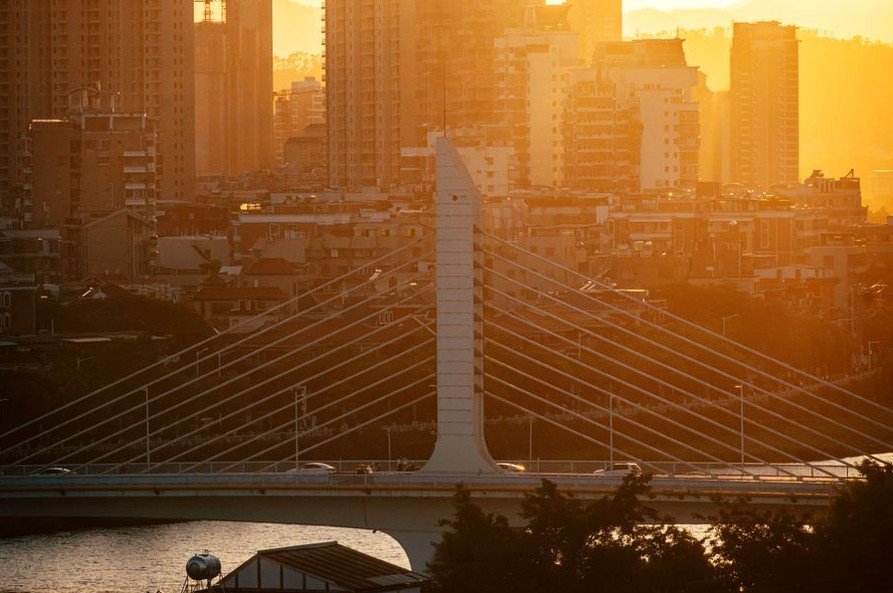
Pick a golden hour image where the skyline or bridge deck sits in the lower third and the warm sky fills the rest. Your icons then rest on a calm gradient instead of fighting windows and cables. Wallpapers4screen.com offers its cities wallpapers as free downloads at 3840x2400, so a clean setup costs nothing and needs no purchase paperwork.
What makes a golden hour shot work behind icons
Low sun flattens contrast and turns glass towers into soft amber blocks. That matters because harsh midday detail makes file names hard to read, and you end up squinting at your own desktop. A rooftop panorama taken at dusk gives you a dark band of buildings at the bottom and open sky above.
Suspension bridges solve a different problem. The main cables draw one long curve across the frame, so the eye follows a single line instead of scattered detail. Put your icon column on the side where the bridge tower is not, and the composition stays balanced.
Resolution and cropping
A 3840x2400 file has a 16:10 shape. On a 16:10 laptop it fits edge to edge, but a 16:9 4K monitor trims 240 pixels of height. Choose images where the horizon has breathing room above and below, so the trim never cuts a tower top or the waterline.
The resolution also protects you on smaller screens. Scaling a 4K-class image down to a 1920x1200 display keeps cable lines and rooftop edges sharp, while stretching a small file upward blurs them.
Where to look in the catalog
The cities section runs to 269 pages, and the site does not sort by time of day, so filter by subject. Its catalog is a practical place to apply this guide on How to Choose Rooftop City Panoramas and Suspension Bridges at Golden Hour for a Clean Desktop Setup. Start with New York and San Francisco, since both appear in the catalog and both are bridge cities.
The catalog also carries selective color shots, such as a red cable car in San Francisco against a monochrome street. These are a strong alternative when a full golden hour photo feels too warm for your theme. A black and white frame with one accent color keeps icons readable and still looks deliberate.
Licensing, paperwork, and tax questions
Buyers at companies often ask what documents come with an image, so here is the direct answer. A free download is not a purchase, so there is no invoice, no receipt, and nothing for accounting to book. A digital file also crosses no border as goods, so customs clearance documents do not apply.
The real legal question is usage rights. Wallpapers4screen.com presents these files as wallpapers for desktop, which covers putting one on your own screen. It does not state that you may print the image, use it in advertising, or resell it. If your business wants any of those uses, ask through the Feedback link on the site and get permission in writing first.
Written permission is what protects a company in a dispute. A file with no license trail is safe on a monitor but risky in a brochure. Keep a personal wallpaper personal, and your tax and legal exposure stays at zero.
A quick selection routine
- Check your screen’s aspect ratio before you browse, because it decides how much of the frame survives.
- Open the cities category and shortlist three images with open sky on your icon side.
- Set each one as wallpaper for a minute and read your smallest file name against it.
- Keep the image where text stays legible without a shadow or label background.
Common questions
Do I pay anything to download a cities wallpaper?
No. Wallpapers4screen.com lists its cities wallpapers as free downloads for desktop. There is no checkout step, so no payment documents are created.
Can my company use a downloaded wallpaper in marketing materials?
Not on the basis of the download alone. The site describes desktop use only. Request written permission through its Feedback link before any commercial use.
Will a 3840x2400 image fit a 16:9 monitor?
Yes, with a small crop. A 4K 16:9 screen shows 2160 of the 2400 vertical pixels, so pick images with spare room above and below the skyline.
Is a selective color image better than a golden hour photo?
For crowded desktops, usually yes. A monochrome frame with one accent color gives icons more contrast. Golden hour suits you better if you keep few icons and want warmth.
Open the cities category, shortlist three candidates, and test each against your own icon layout today.
- Reference: https://wallpapers4screen.com/
Write a comment