Top Desktop Backgrounds in Abstract Symmetrical Kaleidoscope Patterns with Rich Depth in Ultra HD
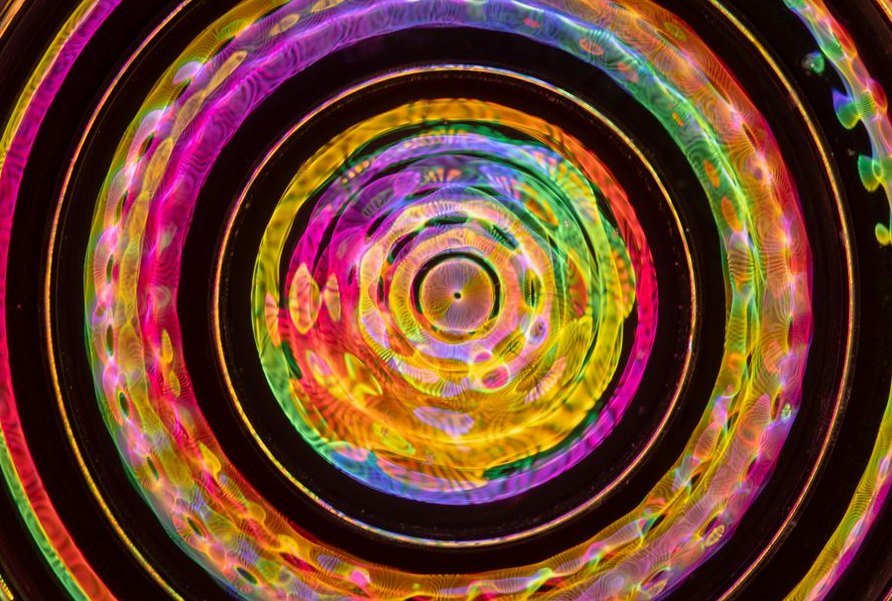
Top Desktop Backgrounds in Abstract: Symmetrical Kaleidoscope Patterns with Rich Depth in Ultra HD
Choose abstract backgrounds by visual structure
The most effective kaleidoscope-inspired desktop backgrounds combine geometric 3D forms, repeated shapes, radial movement, and layered color. The abstract collection on Wallpapers4screen includes files listed at 3840x2400, along with 4K labels and designs based on cubes, waves, neon fragments, spirals, hexagons, and other structured elements.
At this resolution, the images retain enough detail for large desktop displays and wide workspaces. Symmetry gives the screen a clear visual order, while shadows, layering, and perspective add depth behind application windows. Your choice will depend on the balance you want between vivid color, dark contrast, metallic surfaces, and quieter blue tones.
Best matches for a kaleidoscope-style desktop
Colorful 3D cubes offer the clearest geometric interpretation of the style. Repeated blocks form a constructed mosaic, while the rainbow palette brings energy without depending on photographic detail. The result suits a desktop that needs a vivid, dimensional background across a broad display.
The colorful 3D vortex creates more movement. Its spiral structure leads the eye toward the center, making it a useful option when desktop icons sit mainly around the edges. The design combines a rainbow 3D background with colorful wooden spiral elements and a pronounced sense of rotation.
Metal 3D figures give the screen a sharper, more technical character. Cubes, hexagons, and arcs suggest hard surfaces, and the darker palette limits glare across the workspace. This treatment can suit a monitor used for design, editing, engineering, or other tasks that require close attention to detail.
Neon rays and fragmented geometric forms create contrast through bright lines set against black. Listed variations include circuit shards, neon fragments, and dark abstract backgrounds. Their depth comes from light, cracks, and overlapping pieces rather than from solid geometric blocks.
Compare color, depth, and screen balance
Rainbow designs make a plain desktop more expressive, though their saturated colors can compete with colorful icons. Dark neon and metal backgrounds create clearer separation around folders and shortcuts. Blue ice waves offer a calmer alternative, combining gradients and flowing movement with a black base.
Green geometric backgrounds provide another controlled direction. Their listed elements include triangles, arrows, lines, and colorful geometric shapes. The arrangement feels more angular than a radial kaleidoscope, so it may suit users who prefer clear directional lines over circular motion.
Position matters when you compare the available designs. A central vortex or dense cluster can interfere with icons placed in the middle of the screen. Images with darker corners and brighter edges generally leave more usable space, particularly when shortcuts are arranged along the left side.
Where to find the Ultra HD options
The abstract category brings these designs together, making it easier to compare related patterns without moving through unrelated wallpaper themes. Browse Top Desktop Backgrounds in Abstract: Symmetrical Kaleidoscope Patterns with Rich Depth in Ultra HD to review the available geometric and 3D selections.
The page identifies the wallpapers as free downloads and lists the collection as page 1 of 169. You can begin with the visible 3840x2400 designs, then continue through later pages if the first group does not suit your monitor layout or preferred color balance.
A practical selection scenario
If you need three backgrounds for a home workstation, a presentation display, and a second monitor, assign each image according to the screen’s purpose. Colorful 3D cubes work well for the workstation because the repeated blocks maintain depth across a wide surface. For the presentation display, a metal geometric design keeps the overall palette dark, which can help text and interface elements remain readable.
Blue ice waves or a neon-ray composition can serve as the second-monitor choice. The wave design creates a calmer visual field, while neon fragments provide stronger contrast for creative work. Downloading three different files also gives you the chance to compare them at full desktop size rather than relying on the thumbnail.
Check these details before setting the wallpaper
- Confirm that the file is listed at 3840x2400 when you want the highest-resolution option shown in the collection.
- Match the pattern density to your icon placement, since a busy center can make shortcuts harder to scan.
- Use dark metal or neon designs when bright icons disappear into colorful backgrounds.
- Choose waves or restrained geometric forms when the wallpaper should remain visible without dominating the workspace.
- Review the page description and download details before using an image for anything beyond personal desktop decoration.
For a first download, the colorful vortex is the closest match for a rich, symmetrical, depth-focused look. If the central spiral feels too active, compare the cube, metal, and blue-wave designs at full size on your desktop.
- Reference: https://wallpapers4screen.com/
Write a comment