Best 4K Cities Wallpapers Rooftop City Panoramas and Suspension Bridges at Golden Hour
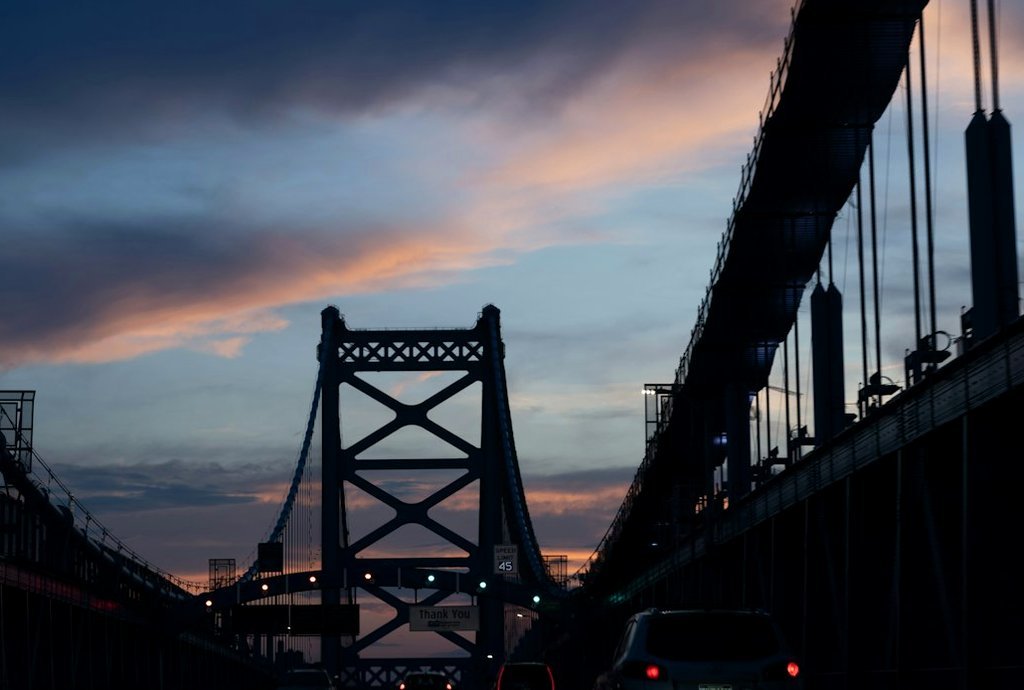
Best 4K Cities Wallpapers: Rooftop City Panoramas and Suspension Bridges at Golden Hour
The strongest city wallpapers combine height, distance, and recognizable landmarks in one balanced frame. For a desktop background, choose images at 3840x2400, then check whether the composition leaves enough open space for icons and remains clear across a large monitor.
Rooftop panoramas work especially well because they show a city as a connected landscape rather than a single building. Suspension bridges add structure across the lower part of the image, while warm evening light can separate the skyline from the sky. The city wallpaper collection at Wallpapers4screen.com focuses on free desktop downloads with city scenes, travel artwork, landmarks, and selective-color photography.
How to choose a city wallpaper for a large screen
Start with the viewing angle. A rooftop panorama should have a clear horizon and enough foreground detail to create depth. If the skyline fills every corner, desktop icons may disappear into busy architecture. Images with sky, water, or a darker roofline usually create a cleaner working area.
Bridge compositions need a similar check. A suspension bridge can guide the eye toward the skyline, but its cables may become distracting when the image is cropped for a laptop or ultrawide display. Look for a frame where the main span stays visible after cropping instead of sitting close to the screen edge.
Resolution matters because city details expose compression quickly. At 3840x2400, windows, cables, towers, and road lines remain more defined than they do in smaller files. That extra detail helps a wallpaper look finished on a large desktop display, particularly when the operating system applies a fit or fill setting.
City scenes that suit this visual style
New York is a natural choice for bridge-focused backgrounds. The collection includes creative city artwork connected with the Statue of Liberty, One World Trade Center, and the Brooklyn Bridge. Those references create a recognizable skyline theme, even when the image uses a poster-like treatment instead of a conventional photograph.
Washington also fits a structured cityscape layout. Its isometric artwork emphasizes landmarks and geometry, which can work well when you want a clean background with strong shapes rather than a dense photographic panorama.
Paris and Athens offer a different balance. Eiffel Tower and Louvre artwork gives the screen a landmark-centered composition, while Athens scenes featuring the Acropolis and Theater of Dionysus add layered stone textures and elevated viewpoints. These options suit users who prefer travel imagery over modern high-rise skylines.
Selective-color designs create another useful category. The orange Alfa Romeo in Milan, the red cable car in San Francisco, the Paris red umbrella, and the yellow Berlin U-Bahn train place one bright subject against a monochrome city setting. That contrast keeps the wallpaper recognizable without covering the entire desktop in intense color.
Where to inspect the available files
Use the Best 4K Cities Wallpapers: Rooftop City Panoramas and Suspension Bridges at Golden Hour category to compare city themes before downloading. Check the displayed resolution, subject, and framing on each preview rather than choosing by title alone.
The collection is organized as a multi-page city wallpaper section, so the first page is only one starting point. Search for bridge views, landmark compositions, and elevated city scenes, then compare how much empty space each image leaves around the central subject.
Preparing a wallpaper for daily use
Download the largest available version when your display supports it. After saving the file, inspect it at full size and check for visible artifacts around bridge cables, building edges, and small signs. These details often reveal whether a background will remain sharp after several hours of use.
Set the image to fill or fit according to its proportions. A 3840x2400 file has a 16:10 shape, so a widescreen monitor may crop a small amount from the top or bottom. Keep the main skyline, bridge span, or landmark away from those edges before applying the image.
Golden-hour styling works best when the screen brightness does not overpower the warm tones. A slightly darker desktop theme can preserve the contrast between the sky, rooftops, and illuminated windows while keeping icons readable.
Acceptance checklist before downloading
- Confirm the file resolution is 3840x2400.
- Check that the skyline or bridge remains visible after cropping.
- Look for open space where desktop icons will sit.
- Inspect cables, windows, and landmark edges at full size.
- Choose a city scene whose color balance suits your monitor.
Select a preview that passes these checks, open its full download page, and save the original file before setting it as your desktop background.
- Reference: https://wallpapers4screen.com/
Write a comment